The best Notion template for college students is one with a page for each class, an assignment tracker with due dates, and a running grade for every class. The extras don't matter much, because the setups students abandon by week 3 are the ones with too many pages to maintain. Seven templates are worth duplicating in 2026, and five of them are free: PassAI's Semester Planner, Easlo Studies' Student Dashboard, Rismo's Simple Student Dashboard, NoteCrafter's Student Dashboard Basic, Cajun Koi's study scheduler, Gridfiti's Student OS, and Notion's own built-in templates.
Below: what each one tracks, what it costs, and who should skip it.
The 7 Notion templates for college at a glance
| Template | Price | Grade tracking | Exam / study planning | Best for |
|---|---|---|---|---|
| PassAI Semester Planner | Free with a PassAI account | Yes, running grade + letter + standing | Study sessions with review dates | Grades and exam prep in one page |
| Easlo Studies Student Dashboard | $0 | Not stated | Not stated | A clean, classic free dashboard |
| Rismo Simple Student Dashboard | $0+ | No | No | Four pages and nothing else |
| NoteCrafter Student Dashboard Basic | Free / pay what you want | No | Pomodoro timer | Free dashboard with a focus timer |
| Cajun Koi Study Scheduler | Check current listing | No | Spaced review scheduling | Students who live by review cycles |
| Gridfiti Student OS | Paid (about $19 in roundups) | Yes, grade calculator | Study zone | One big all-in-one bundle |
| Notion built-in templates | Free | No | No | Class notes and reading lists only |
Prices and features come from each creator's own listing as of October 2026. Template makers change both often, so check the listing before you buy.
What a college Notion template actually needs
A college Notion template needs four things, and each one earns its place for a specific reason:
- A page per class with the professor, room, office hours and grading breakdown. You'll look up office hours the week you're struggling, which is exactly when you won't want to dig through Canvas.
- An assignment tracker with due dates and a days-left countdown. "Due Oct 21" doesn't make you move. "3 days" does, because it turns a date into a deadline you can feel.
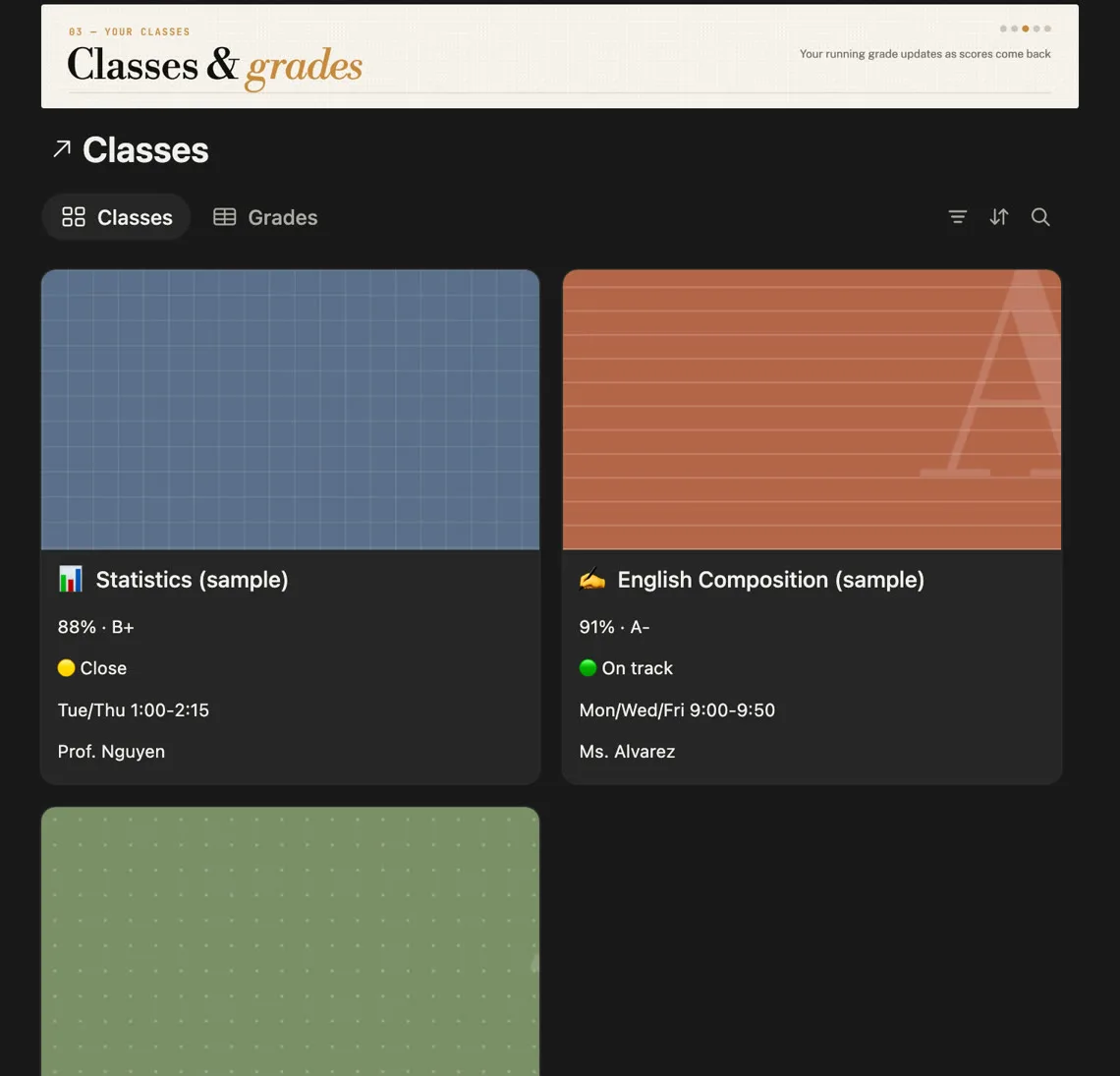
- A grade per class that updates as scores come in. Knowing you're at 88% with a 90% target changes what you study this week. Finding out in December changes nothing.
- A way to plan study before exams. Spacing study over several days beats cramming it into one, which is one of only two techniques rated high-utility in Dunlosky et al.'s review of 10 study methods. A template that only stores deadlines never asks you to start early.
Everything else is decoration. A water log won't get you through organic chemistry.
1. PassAI's Semester Planner: best for grades and exam prep
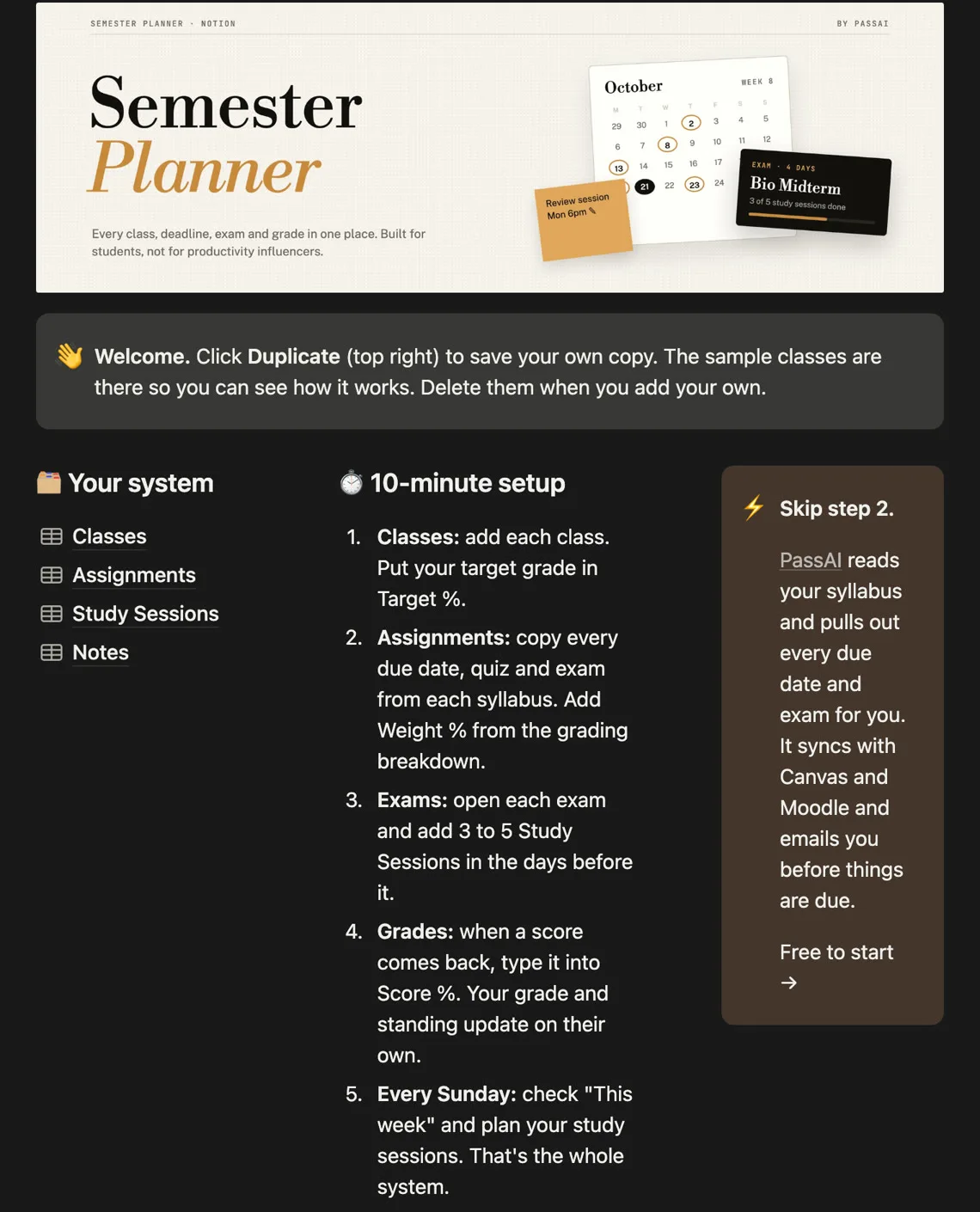
PassAI's Semester Planner is a free Notion template built around the four things above and nothing else: Classes, Assignments, Study Sessions and Notes. It's the only one here that tracks your grade and plans your exam prep.
What it does:
- This week, overdue first. Every assignment due in the next 7 days, with a countdown that reads Overdue, Today, Tomorrow or "3 days."
- A running grade for every class. You enter each assignment's weight from the syllabus and your score when it comes back. Each class shows its percentage, its letter grade, and a 🟢 / 🟡 / 🔴 standing against the target grade you set.
- Study sessions tied to each exam. You add three to five short sessions before an exam, check them off, and rate how well you knew the material. The template sets a review-again date from that rating: 1 day if you were lost, 2 if shaky, 4 if solid, 7 if you nailed it. The exam shows a "Prep done" percentage, so you can see whether you're ready before the night before.
- Cornell-style lecture notes, with questions on the left, notes on the right and a summary at the bottom.
It's free with a PassAI account, and the account is free too. No card. Get the Semester Planner here. Full disclosure: we made it. It also doesn't fill itself in, so you still copy your deadlines in from each syllabus. The last section covers that.
2. Easlo Studies' Student Dashboard: best free classic dashboard
Easlo Studies' Student Dashboard is a free ($0) Notion template that puts classes, notes and assignments in one place. Its bullet.so listing names four features: individual course pages, assignment tracking, a note-taking system and quick navigation.
Its layout is a common starting point: YouTuber Sab Yang credits it as the inspiration for a free student template of their own. Pick it if you want that classic dashboard layout. It doesn't advertise grade calculation or exam planning, so you'd add those yourself.
3. Rismo's Simple Student Dashboard: best if you want four pages and nothing else
Rismo's Simple Student Dashboard is a $0+ (pay what you want) template with four pages: Home, Assignments, Tasks and Notes. It had 49 ratings on Gumroad when we checked.
The Home page holds your class schedule and links to course materials. Assignments tracks due dates, and Tasks breaks each assignment into stages so you can see where you are. It's the most minimal template here. That's the point. Four pages take two minutes a week to keep current, so you actually keep them current. No grade tracking.
4. NoteCrafter's Student Dashboard Basic: best free pick with a focus timer
NoteCrafter's Student Dashboard Basic is free, with an optional pay-what-you-want price. Its listing names five features: individual course pages, assignment and exam tracking, an upcoming assignment and exam overview, quick sidebar navigation, and a Pomodoro clock timer.
The Pomodoro timer is the reason to pick it. Working in short timed blocks makes starting easier, because one block feels doable when "study for the midterm" doesn't. The listing also suggests scanning handwritten notes into each class page, which helps if you take notes on paper. No grade calculation.
5. Cajun Koi's Study Scheduler: best for spaced review
Cajun Koi Academy's study scheduler is built around one idea: review material you know well less often, and material you don't know more often. It's the template behind "How I use Notion to organize my school life," a YouTube walkthrough with over 2.2 million views, and Cajun Koi released a version 2 in September 2024.
Pick it if review cycles are how you study, especially for memorization-heavy classes like anatomy or a language. Its availability has changed over time: the deluxe version's Gumroad listing has said it's not currently for sale. So check Cajun Koi's own site for the current free and paid versions before you plan around it.
6. Gridfiti's Student OS: best paid all-in-one
Gridfiti's Student OS is a paid bundle listed in Notion's template marketplace. Third-party roundups put it at about $19 with 15+ templates, covering semester planning, grade calculation, application tracking, reading lists and a study zone, in an original and a minimal theme.
It's the pick if you want classes, grades, internship applications and reading in one workspace. The catch is size. Fifteen templates is an evening of setup and a lot of upkeep. If you've abandoned a Notion setup before, you know how this ends. Start smaller.
7. Notion's built-in templates: best if you only want class notes
Notion's template picker includes free templates for class notes, reading lists and thesis planning, according to Notion's own guide to setting up Notion for school. They're single-purpose. Good for notes, useless for deadlines.
They pair well with Notion's free plan for students. The Education Plan is free for students at accredited colleges who sign up with their school email, with unlimited pages, file uploads and 30-day version history, re-verified once a year.
Why most student Notion setups die by week 3
Most student Notion setups fail for one reason: they take more upkeep than a student has during exams. A setup with a habit tracker, a mood board, a water log and 47 pages needs feeding every day. When the first quizzes land around week 3, the feeding stops. Then the setup is worse than nothing, because you can't trust it.
Three rules keep a template alive:
- Four or five databases, maximum. Each extra tracker is another thing to update, and the tracker you skip is the one that makes you stop opening the page.
- One weekly check, not daily maintenance. Ten minutes every Sunday on "this week" beats an elaborate morning routine you'll drop. A study schedule built around a weekly review holds up for the same reason.
- Weight your deadlines. A 2% discussion post and a 25% midterm shouldn't look the same in your tracker. Prioritizing by grade weight is what makes the list worth checking.
The part no Notion template does for you
No Notion template fills itself in. Every one on this list starts empty, and you type in every due date, quiz and exam from every syllabus. One History syllabus alone has 16 graded items, so five classes can mean 80 rows typed by hand. That's usually where the setup stalls.
PassAI does that part. You upload a syllabus, as a PDF, a photo or pasted text, and PassAI reads it and pulls out every assignment, exam and grade weight. On that History syllabus, PassAI found all 16 items: 2 exams, 6 quizzes and 8 assignments, each with its weight. If your school uses Canvas or Moodle, you can paste your calendar feed link instead, and PassAI's sync brings in every class at once and re-checks it daily. PassAI then emails you each morning with what's due and what to work on.
You can use both. Many students keep PassAI as the deadline engine and a Notion template for notes and study sessions. If you're weighing the two, our honest Notion vs PassAI comparison covers where each one wins.
Which template should you pick?
Pick by the problem you're actually trying to solve:
- You keep getting surprised by grades or exams: PassAI's Semester Planner, for the running grade and study sessions.
- You want the classic free dashboard: Easlo Studies' Student Dashboard.
- You've abandoned Notion before: Rismo's Simple Student Dashboard. Four pages is a setup you'll keep.
- You struggle to start studying: NoteCrafter's Student Dashboard Basic, for the Pomodoro timer.
- You study by review cycles: Cajun Koi's study scheduler.
- You want everything in one purchase: Gridfiti's Student OS.
Whichever you pick, give it 10 minutes this Sunday. Add this term's classes. Skip the mood board.