Prioritizing assignments by grade weight is the difference between a schedule and a plan. When four things are due Friday, the calendar tells you when — the weights tell you which ones actually decide your semester. A 25% midterm and a 2% discussion post look identical on Canvas, and they are not remotely the same thing.
Here is the method, in five steps you can run in about 20 minutes for a whole semester.
The one rule: weight × urgency, not weight alone
Highest weight does not automatically mean "do first." Highest weight means "the mistake here costs the most." What you actually work on right now is the assignment where weight and time-until-due collide.
The math is simpler than it sounds. For every graded item this week, put its weight next to its due date. The item with the highest weight among the ones due soon is where your Tuesday night goes. A 25% paper due in three weeks does not beat a 5% quiz due tomorrow — you do both, but the paper wins the deep-work hours and the quiz gets the reactive time.
That is the whole discipline. Everything below is the mechanics of getting the weights in front of you fast enough to actually use them.
Step 1: Pull every graded item from every syllabus
Open every syllabus in the same afternoon and write down every dated graded thing. Exams, papers, quizzes, problem sets, discussion posts, participation checkpoints — anything that carries a percentage.
A typical five-course semester has 40–80 graded items once you expand recurring things ("weekly reading quiz" is 12 items, not one). If that number surprises you, that is precisely why the syllabus-week extraction matters — most students discover it in week six when the wall arrives.
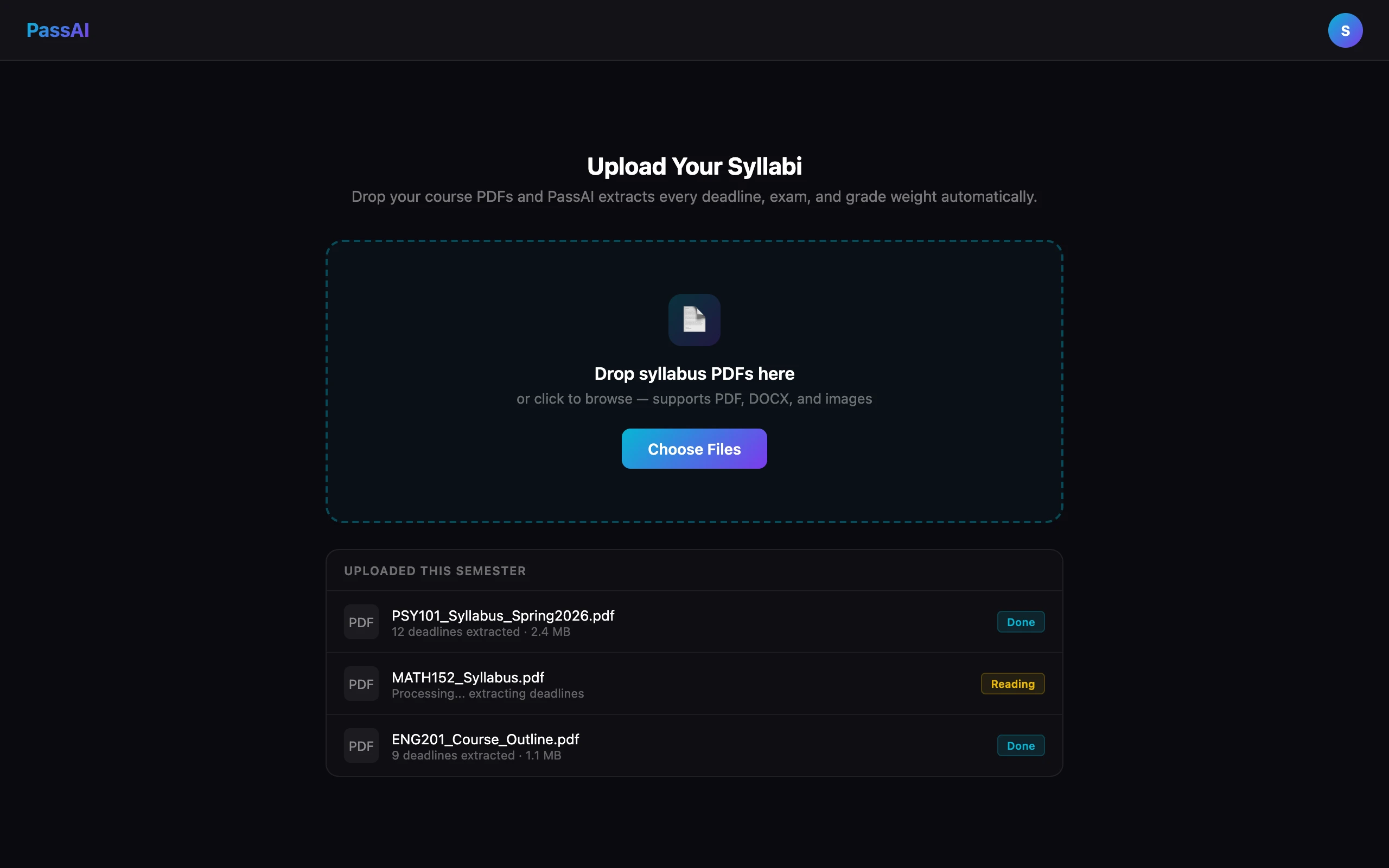
If you'd rather not type all of that: PassAI's syllabus upload reads the PDF and expands recurring items automatically, which is the step this whole method assumes you have finished.
Step 2: Attach the grade weight to each item
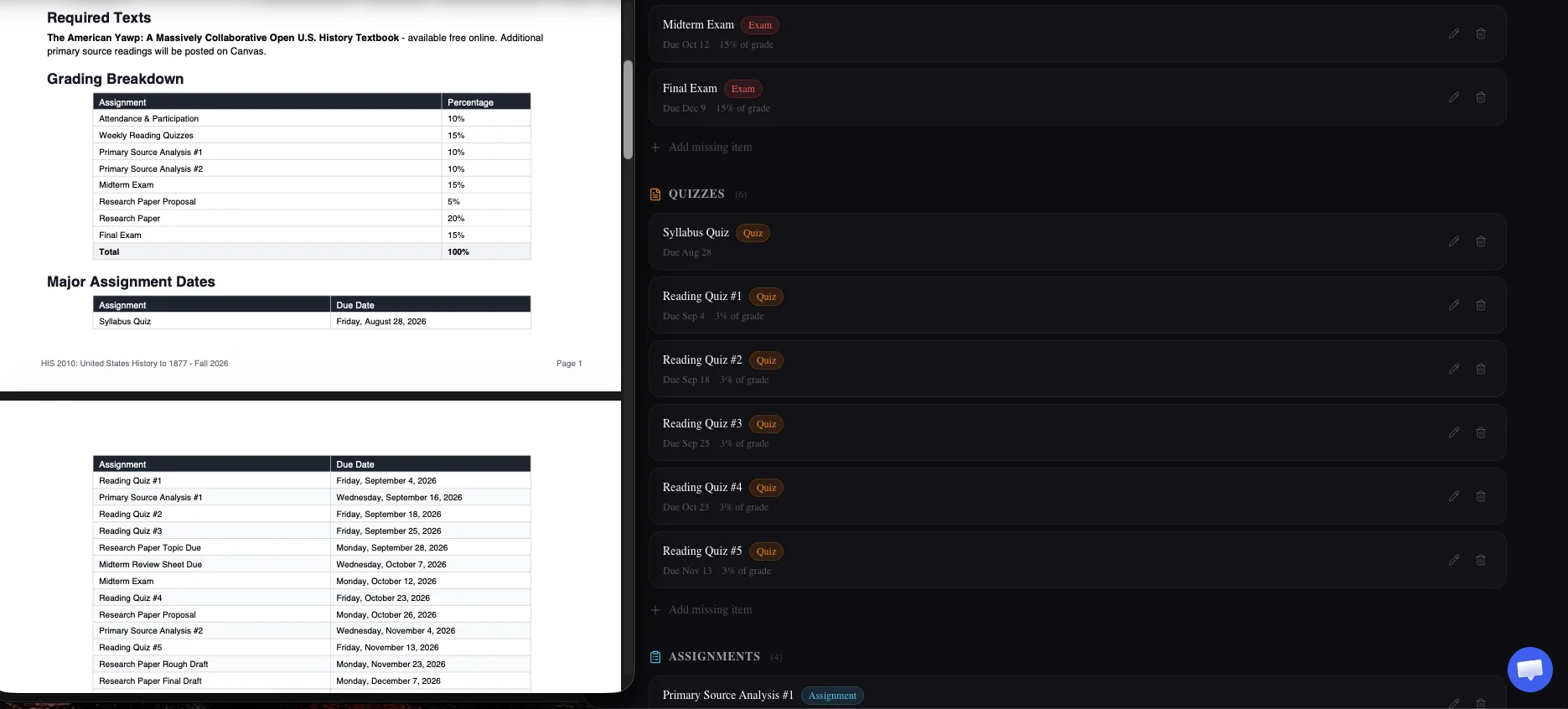
This is the step almost everyone skips. Go back to the grading breakdown table on each syllabus and copy the weight next to each item.
Category weights split across items. "Homework: 30%, six problem sets" means each problem set is 5%. "Exams: 40%, two exams" means each exam is 20%. "Weekly quizzes: 15%" divided across 12 weeks is 1.25% per quiz — small individually, meaningful as a group.
You need this number visible next to every deadline for the method to work. A calendar with dates but no weights is where most students end up, and it is why "just do the earliest thing" becomes the default rule. It is a bad default, and the fix is one column.
Step 3: Sort each week by weight × urgency
For each week, list the items due. Next to each, put its weight. Then sort by a combined weight-and-time judgment, not by either one alone.
The pattern that works: items due this week get done in weight order; items due in future weeks get prep-hours in weight order. If a 20% paper is due in two weeks, this week's deep-work block goes to starting it, not to perfecting a 4% homework due tomorrow. The homework still gets an hour tonight — but not four.
You are looking for the answer to one question: "If I only had time for one more hour of work today, where does it go?" The right column tells you.
Step 4: Apply the 2%-vs-30% test on any close call
When two items feel like a toss-up, run the sanity check: If I had 60 minutes right now, would that hour move the 2% quiz grade more, or the 30% paper grade more?
One hour of paper work moves your final grade about 15x as much as one hour of quiz cramming, because the paper is worth 15x more of your semester. The paper wins almost every time. The exception is when the 2% quiz becomes a 0% if you miss it (some professors zero out late work), because avoiding a zero is worth more than the raw 2% suggests — a zero on a 2% item drops a B+ toward a B faster than most students expect.
Think in points lost, not points earned. That single reframe fixes most misprioritization.
Step 5: Cut the smallest items when the week overflows
Some weeks have more work than hours. This is a fact of college, not a planning failure. When it happens, weight is the tool that tells you what to cut first.
A week with a 25% midterm, a 15% paper draft, a 3% quiz, and a 2% discussion post is not four things to squeeze in. It is:
- One big prep session (midterm) — protect the deep-work hours
- One focused draft session (paper) — a real block, not scraps
- Two items on 30-minute timers (quiz and discussion) — done, moving on
The 3% and 2% do not get your best effort. They get your minimum-viable effort. If you get a B on both instead of an A on both, you lose about 0.5% of your semester. If you get a B on the midterm instead of an A, you lose 2.5% — five times more. That is the trade weights make visible.
A real week, prioritized two ways
Concrete example. Same week, same five items, two different priority rules — chronological and weighted.
Monday: Discussion post (2%) Tuesday: Reading quiz (1.5%) Wednesday: Problem set 4 (5%) Thursday: Midterm study session (midterm = 25%, next Tuesday) Friday: Paper draft (15%)
Chronological priority says: work through Monday's post, then Tuesday's quiz, then Wednesday's problem set, then start studying Thursday for the midterm, then panic-write the paper Friday. Total weighted content this week: 48.5%. Time spent proportional to weight? No. You gave the 2% post and the 1.5% quiz your fresh Monday and Tuesday hours, and the 25% midterm got a single Thursday session.
Weighted priority says: Monday and Tuesday nights are for midterm review (25%) and paper outlining (15%). Wednesday morning takes the problem set (5%) in a 90-minute block. The discussion post gets 20 minutes Sunday night. The quiz gets a 30-minute review Tuesday morning before class. Same items get done, but the 40% of the week that actually decides your grade got your best hours instead of your leftovers.
The output difference is not "you worked harder." It is "the same 20 hours of study went where the weights were." That is the entire method.
What actually changes when you know the weights
The visible change is that you stop working on the wrong things. The invisible change is bigger: you stop worrying about the wrong things. A 3% quiz you have not started stops feeling like a crisis when you can see it is worth 3%. A 25% paper stops feeling like a future problem when you can see it is worth 25% and you have three weeks.
Anxiety about assignments is not usually about the assignments themselves. It is about not knowing which ones matter. Weights fix that by putting a number on it — the number is either small enough to relax about, or large enough to justify the hours. Either way, you know.
Students who track their grades this way finish the semester having spent their hours in roughly the same ratio as the grading breakdown itself. That is the goal. Time in equals weight out.
Why "just do the earliest" is the wrong default
The intuitive rule is chronological: work on whatever is due next. It feels responsible. It is not — it just puts you at the mercy of your professors' scheduling.
A syllabus with a 2% quiz on Monday, a 4% homework on Tuesday, and a 25% paper on Friday punishes chronological thinking. You spend Monday and Tuesday on 6% of the class, then hit Friday with the paper untouched. Do the paper Sunday through Wednesday instead, and the quiz and homework still get done — they just get done in the leftover slots that would have been paper time under the wrong rule.
Chronological priority optimizes for finishing things. Weighted priority optimizes for your grade. Only one of those is what you are being measured on.
How PassAI does this without the math
Everything above assumes you have every item, every weight, and every date lined up in one view. That is the whole trick — and it is the step that eats an afternoon by hand.
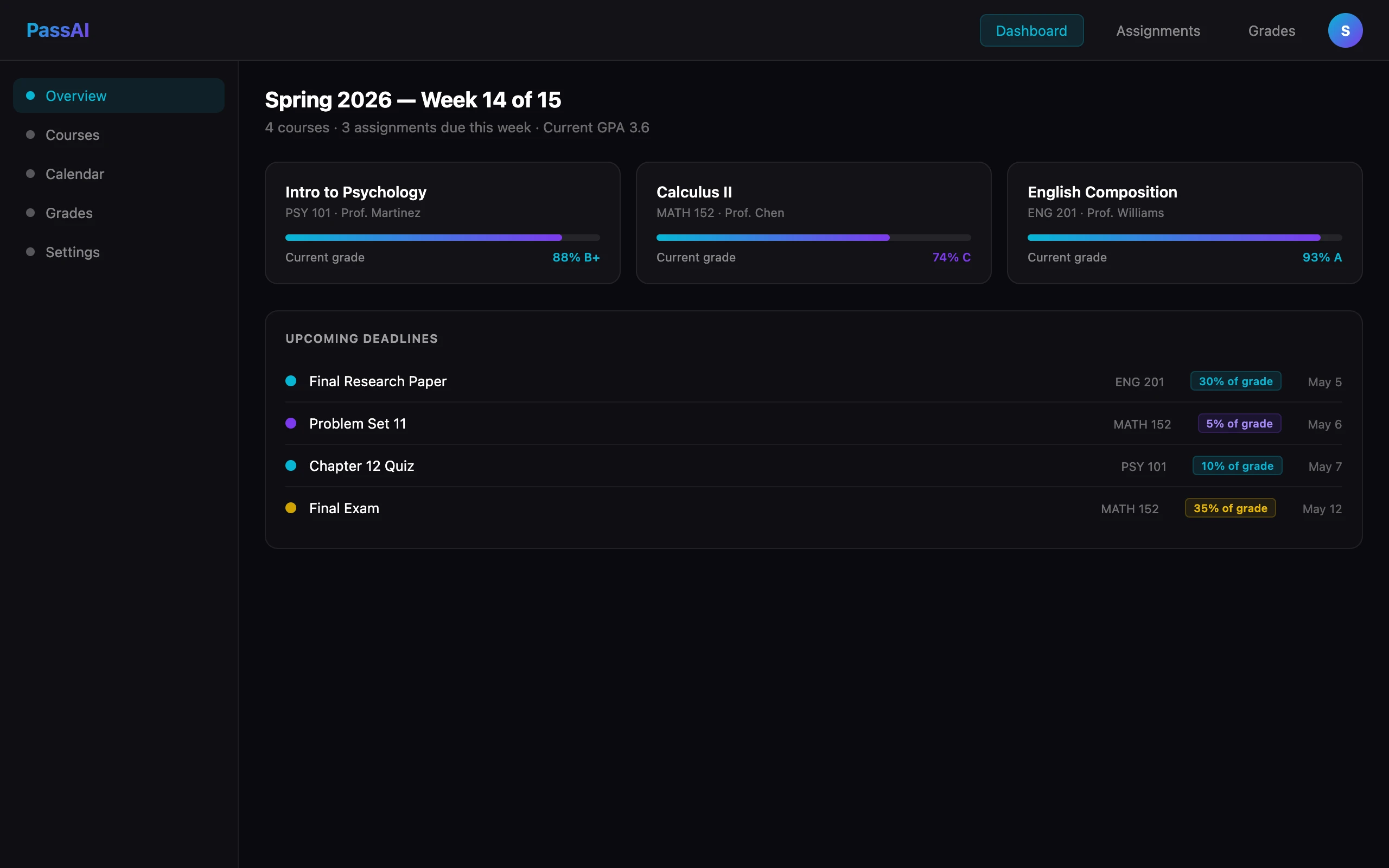
PassAI reads your syllabus PDF, extracts every graded item, pulls each item's weight off the grading breakdown table, expands recurring items like "weekly reading quiz" into individual dated entries, and puts all of it on one dashboard with the weights already attached. You do not calculate percentages. You do not split category totals by hand. You do not maintain the spreadsheet.
Then the grade calculator does the second half of the math — it tells you, given your current grades and remaining weights, exactly what you need on the final to land your target. "94% or higher to reach A" is a more useful number than "you are at 88%."
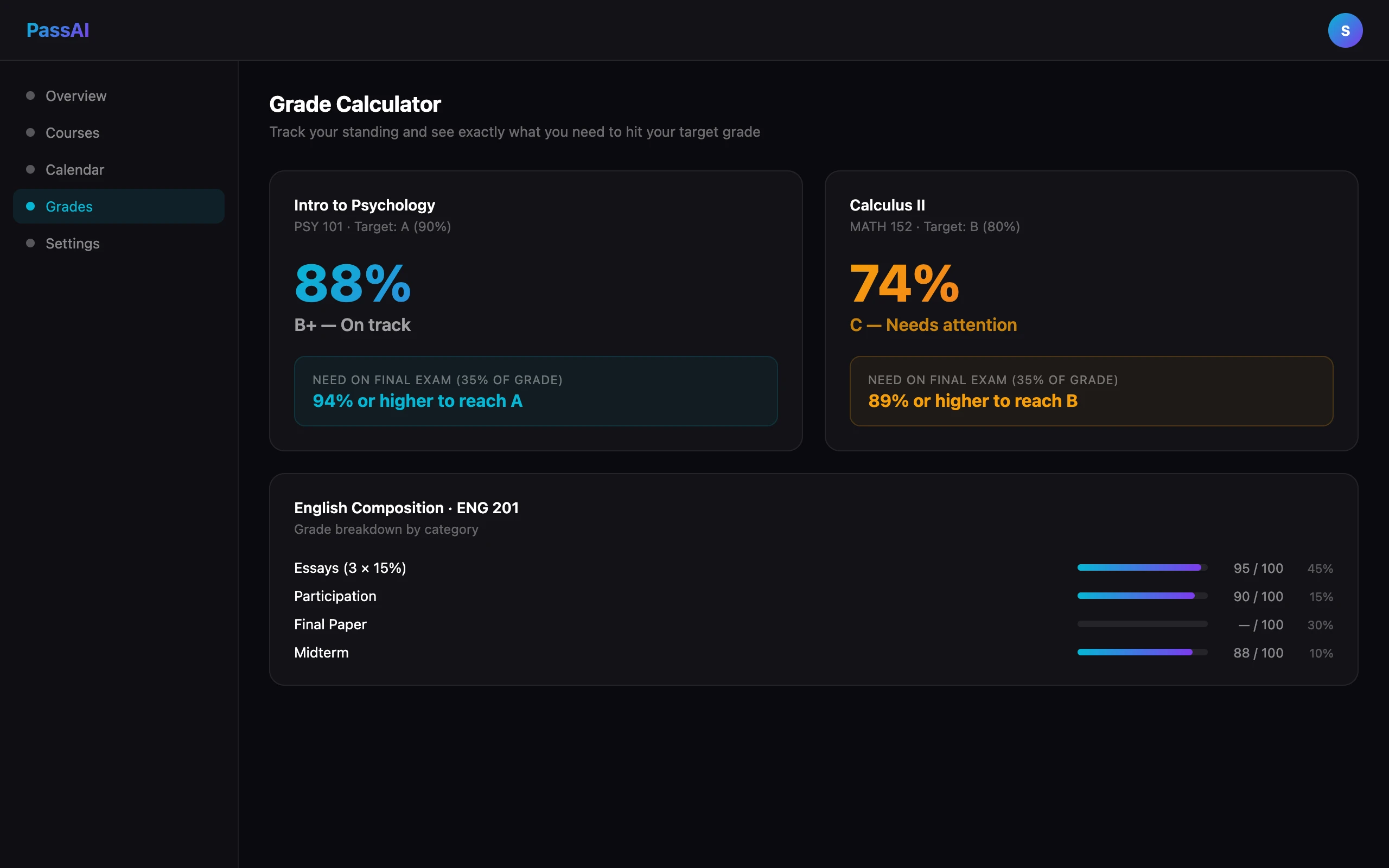
Both pieces work together: the dashboard shows you what to prioritize this week; the grade calculator shows you what your effort needs to translate to by the final. Between them, the guessing is gone.
If your professors are on Canvas but only intermittently — which most are — Canvas alone won't give you this. It shows dates without weights, which is the exact failure mode this method is designed to fix.
Start with your heaviest course this week
The fastest way to try the method is to run it on one course — the one with the densest grading table and the most deadlines this month. Pull the weights, sort by weight-and-urgency, and see what changes about your week.
If the top of the list matches what you were already doing, you were prioritizing correctly. If it does not, you just found where your hours were leaking. That is the whole point.
The best syllabus apps roundup covers which tools do this extraction well and which stop at dates. And if you want the semester-scale version of this method — mapping out disaster weeks before they arrive — how to plan a semester in one afternoon is the companion post.