The best Coursicle alternative depends on which job you need done. Coursicle is strongest at registration: building a schedule, reading professor reviews and catching an open seat. For the 15 weeks after you get your classes, PassAI reads every syllabus with its grade weights and plans the semester around your crunch weeks. DormWay is the closest free planner, MyStudyLife handles rotating schedules, and Power Planner is a free manual planner with a GPA calculator.
Coursicle isn't a bad app. It has grown from a registration tool into a planner too, with free syllabus uploads, assignment sync from your LMS, and reminders. Coursicle can hold your deadlines. What you have to decide is whether a list of deadlines is enough.
Quick answer: which alternative for which job
Pick by the problem you actually have:
- You need a plan for the semester, not just a list: PassAI. It reads each syllabus, attaches grade weights, and flags the weeks where three classes collide.
- You want a free planner that reads syllabi and imports your LMS calendar: DormWay.
- Your school runs Day A/Day B or Week 1/Week 2 schedules: MyStudyLife.
- You'd rather type everything in yourself and pay nothing: Power Planner.
- You only need registration help: your school's registration portal plus Rate My Professors.
Most students need two of these, because registration and the semester are different jobs. The setup that covers both is near the end.
What Coursicle does well (and what it skips)
Coursicle does registration better than any planner on this list. Its schedule builder shows which sections fit together, its professor reviews come from verified students at your school, and its seat tracking watches your registrar and notifies you the moment a full class opens up. It supports over 1,000 US colleges. None of the planners below build schedules or watch seats for you.
It also covers the basics of a planner now. Per Coursicle's own FAQ, the schedule maker, professor reviews and assignment sync are free, and it syncs with Canvas, Brightspace, Blackboard, Google Classroom, Moodle and Sakai. Its blog adds that a syllabus upload gives you back an assignment tracker, and that it has native iOS and Android apps. Premium is optional, with extras like more seat alerts.
What it skips is the planning. Coursicle gives you the deadlines. If week 9 has two midterms and a paper due within four days, it won't warn you, and it won't tell you the paper is worth 25% of your grade while the quiz next to it is worth 2%. We couldn't find Coursicle saying it reads grade weights from a syllabus. That's the gap the planners below try to fill.
Coursicle alternatives compared
| App | Registration tools | LMS sync | Reads your syllabus | Free plan | Platforms |
|---|---|---|---|---|---|
| Coursicle | Schedule builder, professor reviews, seat alerts | Canvas, Blackboard, Brightspace, Moodle, Sakai, Google Classroom | Yes, as an assignment list | Main features free | Web · iOS · Android |
| PassAI | No | Canvas, Moodle | Yes, with grade weights and exam topics | 14 days full access, then 2 classes free | Web |
| DormWay | No | Calendar feeds from Canvas, Blackboard, Brightspace, Moodle, Google Classroom and more | Yes | Core features free | Web · iPhone · iPad · Mac |
| MyStudyLife | No | Lists Canvas and Blackboard | No, but it reads a timetable photo | Free | Web · iOS · Android |
| Power Planner | No | No | No, you type it in | Free · $4.99 one-time upgrade | Windows · Mac · iOS · Android |
Every row comes from the app's own site or store listing, checked in October 2026.
1. PassAI: for the semester after registration
PassAI is a study planner that reads your syllabus and plans the semester from it. You upload a PDF, Word file, photo or pasted text. PassAI's syllabus extraction pulls out every assignment, quiz and exam with its due date and grade weight, then shows you a review screen so you can confirm what it found. On a real US history syllabus (HIS 2010), that was 16 graded items: 2 exams, 6 quizzes and 8 assignments, each with its weight.
What it does with that list is why it's here:
- PassAI's Semester Map puts all your classes on one timeline and marks the crunch weeks, the ones where several classes put something big due within days. Every exam, and anything worth 15% or more, gets a start date: 7 days ahead for an exam, 10 for a final or project, and 3 more if it lands in a crunch week. You start before the pileup instead of during it.
- PassAI's daily email lists what's due today and tomorrow, warns you 7 days and 3 days before every exam and every item worth 15% or more, and sends the week ahead on Mondays.
- PassAI's grade tracking shows where you stand against the syllabus weights as scores come back, and it stays free on every plan.
- PassAI's Canvas and Moodle sync pulls in due dates from your LMS calendar and merges them with what the syllabus says. A calendar link puts everything in Google, Apple or Outlook Calendar, and a Notion sync is there if you plan in Notion.
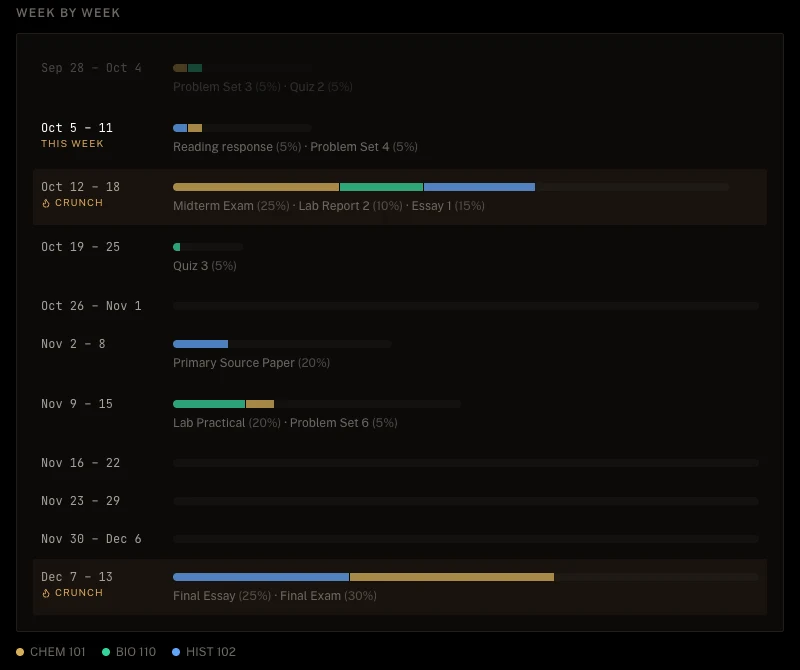
Where PassAI is weaker than Coursicle: it does nothing for registration, there's no native phone app, and Blackboard and Brightspace sync aren't live yet. Every account starts with 14 days of full access and no card. After that the free plan keeps 2 classes with their daily email.
If you're setting up the whole semester at once, how to plan a semester in one afternoon walks through it.
2. MyStudyLife: for rotating and block schedules
MyStudyLife is a free planner for classes, homework and exams, and it handles schedules that rotate. Day A/Day B, Week 1/Week 2 and block weeks are supported out of the box, which most college planners skip. You can type your classes in or snap a photo of your timetable.
It tracks homework and exams with countdowns and reminders, and has a focus timer and an AI assistant called Scout. Its site lists Canvas and Blackboard among the calendars it connects to, alongside Google, Apple and Outlook. It doesn't read a syllabus, so assignments and grade weights go in by hand.
MyStudyLife has its own Coursicle alternative page. It says MyStudyLife is free on web, iOS and Android, with no ads in the planner. If you're also weighing other planners, our My Study Life alternatives comparison goes deeper.
3. DormWay: the free planner closest to Coursicle's
DormWay is the closest free match for Coursicle's planner side. Its core is free for students: unlimited syllabus uploads read by AI, an assignment tracker, and a GPA and grade calculator. It accepts PDFs, Word files, spreadsheets, screenshots, photos, and ICS or CSV calendar files.
For LMS data, DormWay imports calendar feeds from Canvas, Brightspace/D2L, Blackboard, Moodle, Google Classroom, Schoology and IvyLearn, and connects to Google Calendar directly. You set it up on the web and use the iPhone, iPad and Mac apps between classes. Android is listed as coming soon.
The open question is Pro. DormWay's pricing page says Pro isn't for sale yet and that it'll describe the features and price when it's ready. Today it's $0, which makes it the easiest switch if Coursicle's planner was all you used.
4. Power Planner: a free manual planner with a GPA calculator
Power Planner doesn't read syllabi or sync with an LMS. You type in your classes, assignments and exams. In return, the free version is fully functional with no ads, and it runs natively on Windows, Mac, iPhone and Android.
Its strongest feature is grades. It calculates GPA and has a "What If?" mode for planning what you need. Power Planner's site sells Premium as a one-time purchase under $5, not a subscription, for unlimited grades per class and multiple semesters.
The trade is time. At 16 graded items per class, like the HIS 2010 syllabus above, a 5-class semester is 80 deadlines to enter by hand. That's the whole reason syllabus scanners exist. If you'd rather spend that hour than any money, Power Planner is the best manual option.
5. Your school's registration tools and Rate My Professors
If registration is the only reason you opened Coursicle, the free tools you already have cover most of it. Your school's registration portal is the only system that can actually enroll you. It shows live seat counts, and at schools with a waitlist, it's the waitlist that actually moves you into the class when a seat opens.
For choosing sections, Rate My Professors and your school's official course evaluations show how other students rated a professor. The evaluations are the better signal when your school publishes them, because only enrolled students can fill them out.
What you lose by leaving Coursicle here is the bundle: one app with the schedule builder, the reviews and push alerts when a full class opens. If you check seats by hand once a day, you won't miss much. If you're chasing a class that fills in minutes, keep Coursicle's seat alerts for that week.
Use Coursicle + one planner: the setup that covers both
The setup that works for most students is Coursicle for registration week and a real planner for the semester. They don't compete. One gets you into the right classes, and the other gets you through them.
- Registration week: use Coursicle to build your schedule, read reviews and set open-seat alerts.
- First day of classes: download each syllabus from Canvas or your email and upload them to your planner. In PassAI each one takes under a minute.
- Check the first upload against the PDF. Every syllabus app gets something wrong eventually, and catching it in week 1 is cheap.
- Look at the crunch weeks before week 3. Those are where you start the big items early, because by the time you're in one, it's too late to spread the work out.
If you're not sure which deadline to protect when two land together, the rule is in how to prioritize assignments by grade weight. And once grades start coming back, PassAI's free final grade calculator tells you what you need on what's left.