Planning a semester in one afternoon means one thing: sitting down on the Saturday after syllabus week and doing the whole thing before dinner. Every syllabus opened, every graded item extracted with its weight, every disaster week flagged, every study block booked in advance. Four hours by hand for five courses, or roughly 90 minutes if you let PassAI's syllabus upload do the extraction. What you get back is the one artifact that changes how the semester feels — a single map that tells you which weeks are going to try to kill you, and which weekends you should not agree to travel.
Most students never do this. They enter dates from the first two syllabi, get bored, promise themselves they will finish it later, and then find out in week seven that a paper and two midterms landed on the same Wednesday. This post is how to actually finish.
Do it on the Saturday of syllabus week — not sooner, not later
Saturday of week one is the correct time because you have every syllabus and no assignments are due yet.
Every earlier attempt fails on the same problem: professors edit the syllabus between when they post it and when class actually meets, so a plan built from last semester's document or a pre-uploaded draft ranks out of date by day one. Every later attempt fails on the opposite problem — by week three there is already a discussion post due Sunday and a reading for Monday, and the two hours you needed for the plan are the two hours you owed the class.
You want the syllabus PDFs your professor handed you on day one, and you want a Saturday afternoon before anything is graded. Block four hours. Bring coffee. If you have five courses and a working syllabus scanner, you will finish in two. This is the highest-leverage afternoon of the entire semester.
What "planned" actually means — three artifacts, not one
A planned semester is exactly three things: a master deadline list, a disaster-week map, and a booked study calendar. Not a color-coded Notion database. Not a Pinterest planner spread. Three artifacts.
The master deadline list is every graded item from every course, sorted by date, with the grade weight attached. On a real 12-week history course this comes out to about 16 items — 2 exams, 6 quizzes, 8 assignments — and you need all of them in one place before you can see anything.
The disaster-week map is a one-page view of the semester with the weeks that carry three or more high-weight items shaded in. You do not fix these weeks — you cannot — you just see them coming.
The booked study calendar is workblocks placed on your Google Calendar in week one, before anything else claims those hours. The rule is simple: any item worth 15% or more of your grade gets a study block booked two weeks before its due date. Bookings made in week one hold. Bookings made in week seven get bumped.
Everything else — the aesthetic planner, the color codes, the sticker collection — is optional and mostly costs you the afternoon. Skip it. The three artifacts are the entire deliverable.
Step 1: Get every syllabus in one place (10 minutes)
Open every syllabus PDF, drop them into a single folder, and rename each one Course-Code-Syllabus.pdf. Ten minutes, then done.
The reason to do this first is that half the friction in planning a semester is hunting for the file. Some professors post the syllabus to Canvas, some to a course website, some email it as an attachment, and about one in five hands out a paper copy in the first lecture and never posts it anywhere. Chasing them one at a time on the day you also need to extract 40 deadlines is why students give up in the middle.
Get the folder built first. If a syllabus is missing, that is the one email you send this weekend — before you sit down for the real work.
Step 2: Extract every deadline and every grade weight (60 minutes by hand, 5 with a scanner)
Read each syllabus and pull out three things per graded item: what it is, when it is due, and what percentage of the final grade it is worth. Nothing else, not yet.
By hand this takes about 12 minutes per course if the syllabus is well organized and closer to 20 if it is not, because grading tables get buried and recurring items like "weekly quiz" have to be expanded into 12 individual dated entries or you will forget half of them. Five courses is an hour of real focused work.
With PassAI, the same extraction runs in about five minutes per course — you upload the PDF, PassAI extracts every graded item and reads the grading breakdown table, and you get back a list of 15 to 25 items per class with the weight already attached. On a real Historical Investigations 2010 syllabus, PassAI's extractor found 16 graded items: a 15% midterm, a 15% final, 6 quizzes (including weekly reading quizzes expanded into individually dated entries), and 8 assignments (including a research paper split into a rough-draft deadline and a final-draft deadline). Every weight came off the grading table correctly. Dates PassAI calculated rather than read got flagged as inferred, so on a syllabus that says "Week 6" instead of a real date, you know which handful to confirm with your professor.
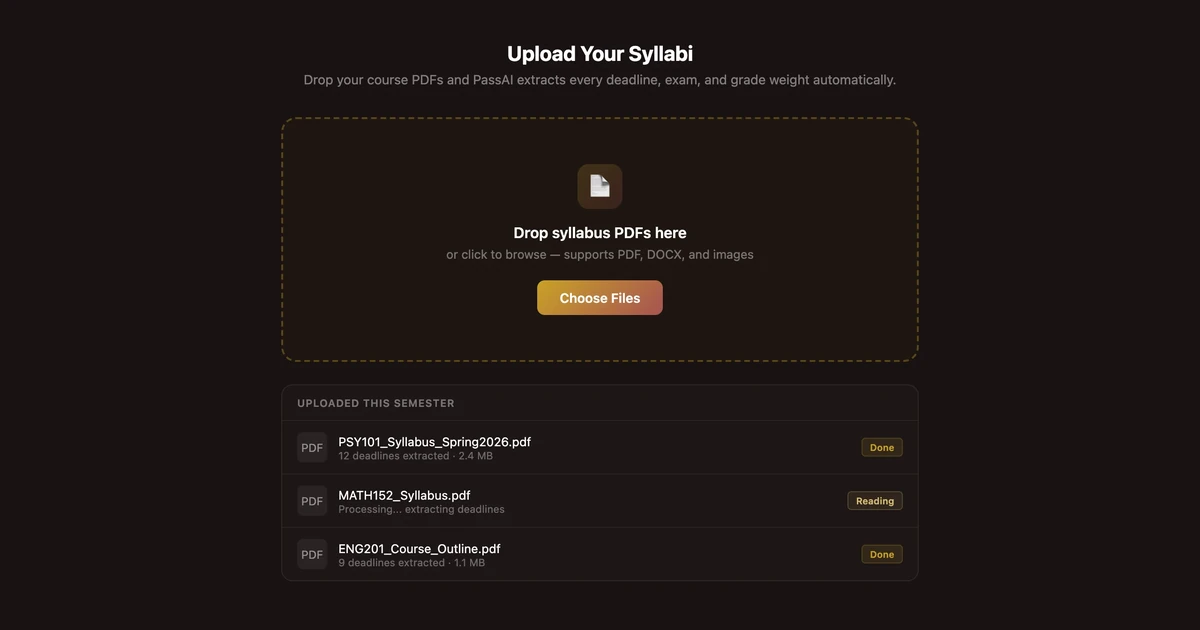
Either path — hand or scanner — the output at the end of this step is the same: one sorted list of every graded item, dated, weighted. Do not skip weights. A calendar of dates without weights is what you already had, and it is not a plan.
Step 3: Find your disaster weeks before they find you
Look at the sorted list and highlight every week that contains three or more items adding up to 25% or more of any single class's grade. Those are your disaster weeks. There are usually two per semester and they are almost always weeks 7–8 (midterms plus paper drafts) and 14–15 (finals plus final projects).
You cannot make a disaster week vanish. Your professors did not coordinate their syllabi, and the same weeks pile up for structural reasons — everyone runs midterms around the same point in the term, everyone assigns papers in the last third. What you can do is start the item with the earliest possible start date two weeks early, and move the smaller of two exams' study block up by a week. A disaster week you saw in August becomes a busy week; a disaster week you found out about the Wednesday before is a crisis and probably a lower grade.
This is the single reason to bother with a semester plan. Every other step is scaffolding for this one insight.
Step 4: Book the workblocks now, while your calendar is still empty
For every item worth 15% or more, put a two-hour study block on your calendar exactly two weeks before its due date. Book it now, before club meetings and study groups and part-time shifts claim those hours.
The federal definition of a credit hour is one hour of class plus two hours of outside work per week (34 CFR 600.2), which means a five-course, 15-credit load already expects 30 hours of studying every week on top of your 15 hours in class. Those hours exist whether you schedule them or not. The difference is that scheduled hours actually get worked, and unscheduled hours get eaten by whatever asks first.
Two weeks out is the correct offset because most 15%+ items — papers, projects, exams — need more than one working session and cannot be salvaged the day before. A midterm study block booked in week five for a week-seven midterm survives contact with reality. A midterm study block invented on Sunday night for a Monday exam is a cram session with a different name.
If you use PassAI, the day-by-day plan does this booking for you automatically once your syllabi are uploaded, and the daily email reminds you what block you agreed to that morning. Either way, the workblocks need to exist on the calendar in week one or the plan is decorative.
Step 5: Put the map somewhere you will actually see it
The finished plan has to live in one place you check every morning, or it does not exist. A Google Calendar with the workblocks in it, a Notion page you actually open, or the PassAI dashboard — pick one.
The failure mode is the beautiful printed wall poster that nobody looks at after October, or the four different tools that all hold half the plan. A plan that lives in one place and updates in ten minutes when a professor moves a deadline stays useful. A plan spread across a paper planner, Canvas, a Google Doc, and a wall calendar goes stale the first time anything changes, which is usually week two.
We covered the ongoing maintenance side in time management for college students — the semester plan is the map, the weekly schedule is what you build against it every Sunday night.
What you can skip on purpose
Three things students spend hours on in September that do not survive to October: color coding by class, decorative planners, and semester goal-setting rituals.
Color coding by class looks organized and adds nothing. You already know which class the deadline is for because it is on the deadline. If you must color, code by stakes — one color for anything 15%+, one for everything else. That distinction actually changes how you look at the calendar.
Decorative planners are a hobby, not a plan. The Instagram-perfect layout takes an hour per week to maintain and drops the first time you are tired. A plain calendar with entries in it holds up under stress.
Semester goal-setting — "I will get a 3.8 this semester" — is not planning, it is wishing. The plan is the workblocks. You either did the two-hour block on week 5 Tuesday or you did not. Grades follow those blocks; they do not follow the goal you wrote in the front of a notebook in August.
Skip all three. Save the afternoon for the extraction.
The scanner shortcut — when to use it
If your five syllabi total more than 60 pages or contain dense grading tables, a syllabus scanner cuts the extraction step from about an hour to about five minutes and is worth it for that reason alone. On a normal semester, that is most students.
PassAI reads PDFs up to 10MB natively, Word .docx, and pasted text. It handles the two extraction failure modes that eat the most time by hand — expanding recurring items like "weekly quiz" into 12 dated entries, and flagging dates it inferred from "Week 6" language so you know which ones to confirm. Every account starts with a 14-day Pro trial, no credit card, which is long enough to plan the whole semester with everything unlocked. After it, the free plan keeps 2 classes with full grade tracking. Pro is $9.99/month, $24.99 for a 4-month Semester Pass, or $49.99/year, with the day-by-day plan and daily email reminders for every class.
If your syllabi are short and clean, doing it by hand for the practice of reading each grading table closely is defensible. If they are not, the afternoon compresses by about three hours. Compare a few honestly in best syllabus apps for college students before you commit.
The one afternoon is the entire trick
Everything hard about a college semester is downstream of not seeing week seven in week one. The disaster weeks are known in August; the papers are announced on the syllabus; the midterm dates are printed in bold. The information exists. Whether you sit with it for four hours in the first week decides whether the rest of the semester is measured busy work or triage.
Block the Saturday. Get the folder built, extract every deadline and weight, shade the two disaster weeks, book the workblocks two weeks ahead, and then close the laptop. You already know the plan works — the version of you who did this in August is not the version who is up at 2 a.m. in October.
If you want the extraction done in five minutes per syllabus instead of twelve, PassAI does it. If you just want to know where your grade sits before you start, the free grade calculator is a good ninety-second checkpoint.