The best My Study Life alternative depends on why you're leaving. If it's the hours of typing every class, assignment and exam in by hand, PassAI reads your syllabus and fills the planner for you. If you like manual entry and just want something cleaner, Power Planner is the closest swap. Five other options follow, plus the four things My Study Life still does better than all of them.
My Study Life is a good app. It has 4.5 stars from 6,200 ratings on the App Store, shipped an update on September 17, and its free tier covers classes, homework, exams and reminders across iOS, Android and the web. Students don't leave because it's broken. They leave because of what it asks of them every semester.
The six alternatives at a glance
| App | Reads your syllabus | Grade weights | Price | Platforms | Best for |
|---|---|---|---|---|---|
| PassAI | Yes | Extracted automatically | Free (5 syllabuses) · Pro $9.99/mo | Web | Skipping manual setup entirely |
| Shovel | Yes, or LMS sync | Not advertised | $39/yr after a 7-day trial | Web · iOS · Android | Schools on Canvas, Moodle or Brightspace |
| Power Planner | No | You enter them | Free · $4.99 one-time upgrade | Windows · Mac · iOS · Android · Web | A free, ad-free manual planner |
| myHomework | No | No | Free with ads · $4.99/yr | iOS · Android · Web | The simplest possible homework list |
| Notion | No | Only if you build it | Plus free with a school email | Everything | Students who want to build their own system |
| Google Calendar | No | No | Free | Everything | Time-blocking around a planner |
Why college students leave My Study Life
The main reason is manual entry. My Study Life is a container: it holds a semester you type in yourself. One real syllabus we tested, HIS 2010 (United States History to 1877), contained 16 graded items: 2 exams, 6 quizzes and 8 assignments, each with its own date and weight. Multiply that across five courses and you are looking at roughly 80 entries before the semester even feels organized.
Most students do the first 20 and stop. The planner then shows an incomplete semester, which is worse than an empty one because it looks trustworthy.
The second reason is that its AI reads the wrong document. Schedule Scan reads a photo of your class timetable, when and where each class meets. It does not read the syllabus, which is where the deadlines and grade weights live. Scout, the newer AI study coach, answers questions like "what's due Friday?", but it can only answer from what's in your planner, so every item you skipped entering is invisible to it too.
The third is price creep. The features college students want most, including advanced grade tracking and subtasks, sit behind MyStudyLife+ at $6.99 a month or $39.99 a year.
1. PassAI: best if you want the syllabus read for you
PassAI is an AI study planner that reads your syllabus PDF and extracts every assignment, quiz and exam with its due date and grade weight, in under 60 seconds per course. That removes the step that makes students quit My Study Life.
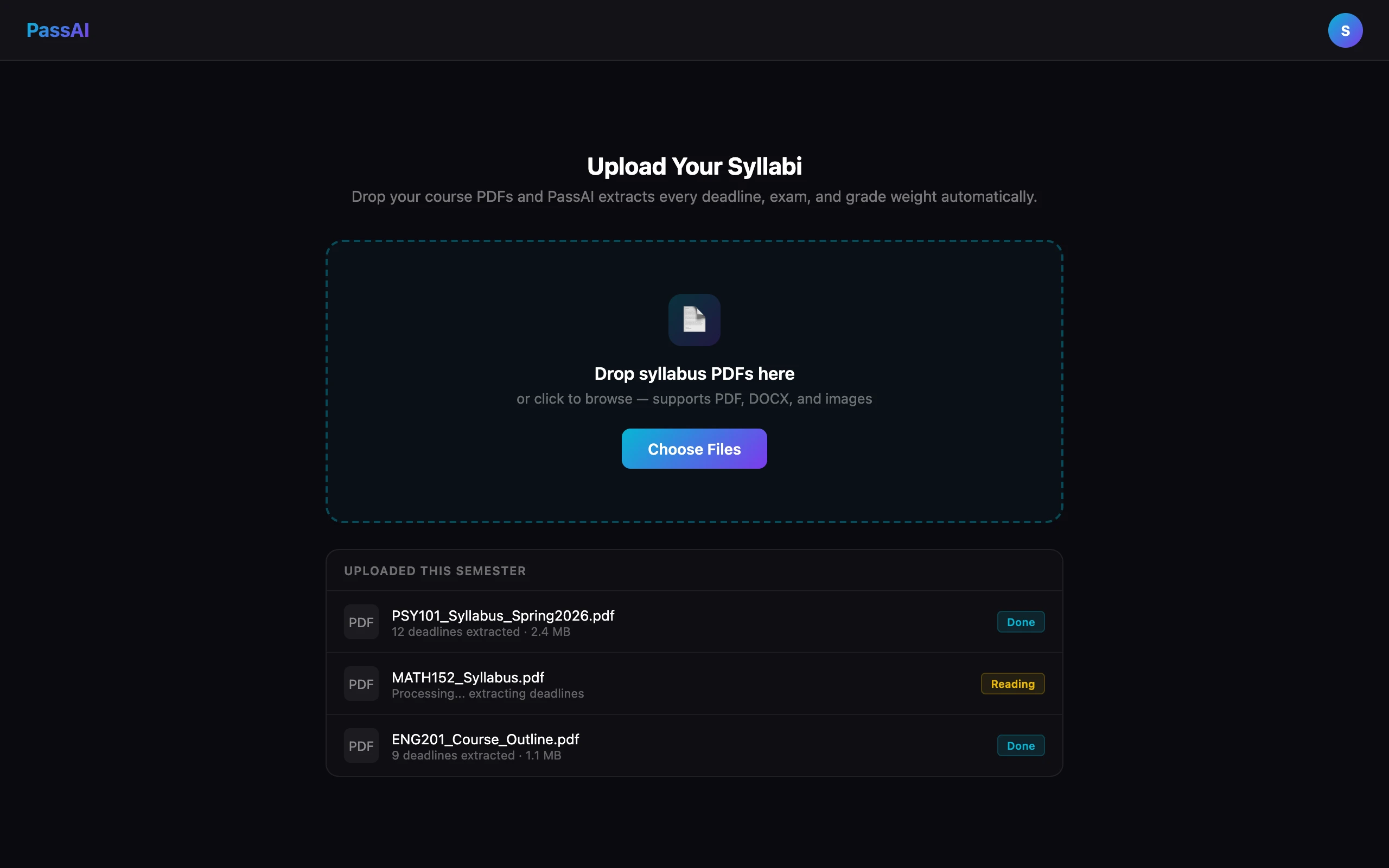
What you get from one upload:
- Every graded item, dated and weighted. PassAI's extraction pulls the grading table, so the 30% midterm and the 2% discussion post are tagged differently from day one. That difference is what should decide your week. We wrote up the method in how to prioritize assignments by grade weight.
- A daily email with what's due. PassAI's reminder email lands every morning, so the planner comes to you instead of waiting for you to open it.
- A running grade per class. Enter scores as they come back and PassAI's grade tracking shows where you stand against your syllabus weights, not against whatever Canvas has entered so far.
- An AI study plan per assignment. PassAI turns one deadline into day-by-day steps sized to the time you have left.
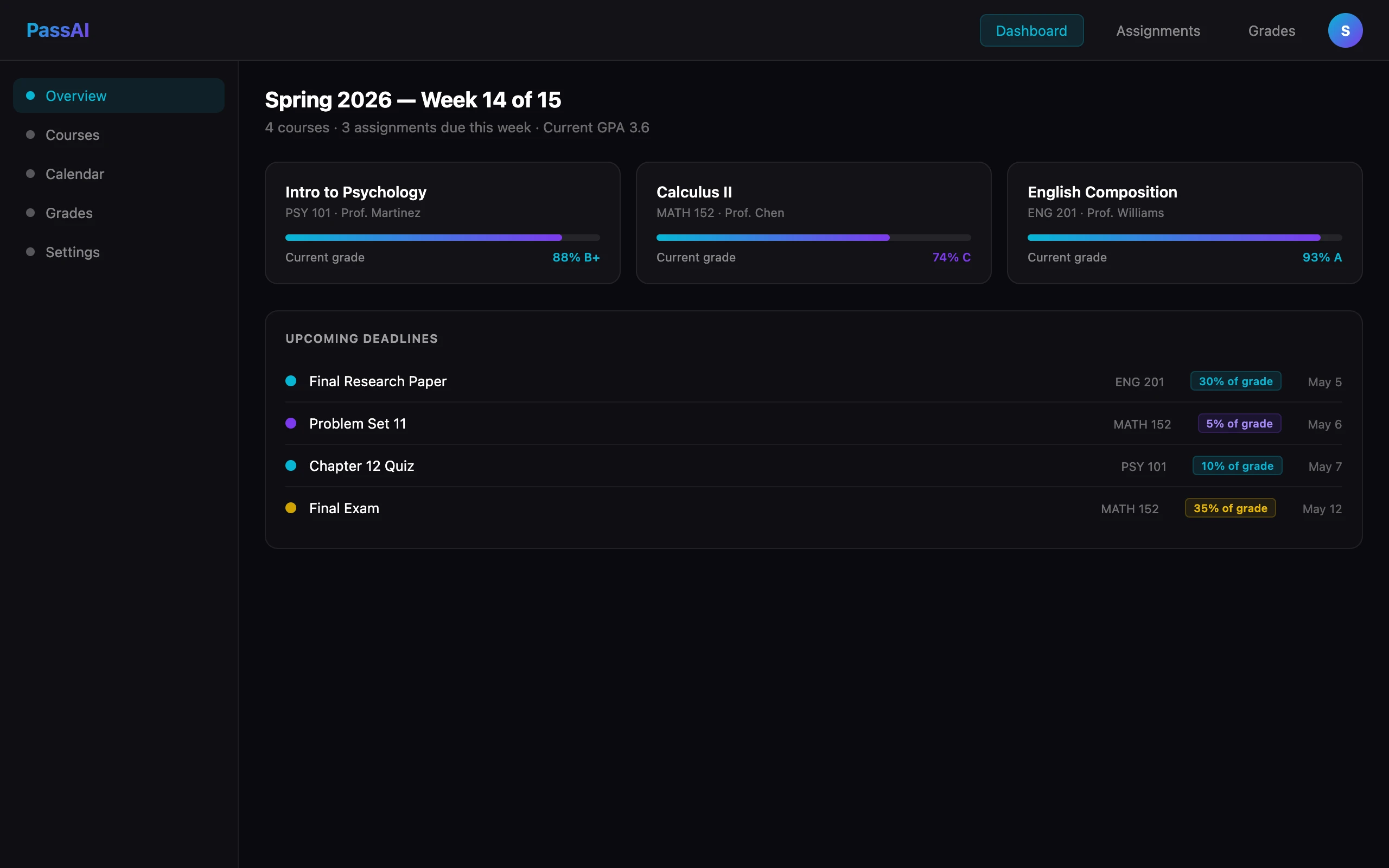
Where PassAI is weaker: it runs in the browser, with no native iPhone or Android app yet, so there are no home-screen widgets. It also does not model rotating block schedules, since college timetables rarely rotate. The free plan covers five syllabus uploads, grade tracking, two AI study plans, and the daily email for two classes. Pro is $9.99 a month or $89.99 a year for every class.
2. Shovel: best if your school runs Canvas or Moodle
Shovel builds a study schedule from your coursework, which it gets either from a PDF syllabus or by syncing with Canvas, Brightspace, Moodle or Google Classroom. Its signature feature, which it calls the Cushion, checks your available study hours against the work due and flags the weeks that won't fit.
The LMS sync is the reason to pick it. If your professors keep Canvas complete and current, Shovel stays accurate without re-uploading anything. It costs $39 a year after a 7-day free trial, with no free tier. We compare it against five other syllabus scanners in the best syllabus apps for college.
3. Power Planner: best free manual replacement
Power Planner is the closest like-for-like swap for My Study Life: you still enter your classes and homework yourself, but the free version is fully functional and has no ads. A one-time $4.99 purchase, not a subscription, unlocks unlimited semesters and more than five grades per class on every device.
Its grade and GPA calculator is the standout, with weighted GPA across semesters. It runs on Windows, Mac, iOS, Android and the web. The cost is the same one you're leaving: every item is typed by hand.
4. myHomework: best if you want a plain homework list
myHomework does one thing: a list of homework and classes with reminders. It is free with banner ads, and $4.99 a year removes them and adds attachments.
It is the lightest option here, which is the point if My Study Life felt like too much app. Be aware that the company's own site now leads with a digital hall pass for K-12 schools, so the student planner is no longer its main product. That is worth weighing if you want an app that will keep improving.
5. Notion: best if you'd rather build your own system
Notion is not a student planner. It is a blank workspace where you can build one, and the Plus plan is free for students who sign up with a school email.
The catch is that you build it. You can build course pages, a deadline database, and grade formulas exactly how you want them, and every one of them is your job. Notion also does not read your syllabus, so the 80 manual entries are still yours to make. Our PassAI vs Notion comparison covers the setup in detail, and many students end up using both.
6. Google Calendar: best for time-blocking, not tracking
Google Calendar is free and already on your phone. It is great at one thing My Study Life isn't: blocking out real hours for studying, around classes, work and everything else.
It has no idea what an assignment is, though. There are no grade weights, no "is this done", and no running grade. Use it alongside a planner rather than instead of one: the planner decides what to work on, the calendar decides when. Our one-afternoon semester plan shows how to book those study blocks.
Where My Study Life still wins
Switching isn't right for everyone, and My Study Life keeps real advantages:
- Rotating and block schedules. If your timetable runs on A/B days or a 6-day rotation, My Study Life handles it better than anything above.
- Family Connect. It has a companion app for parents to see upcoming homework and exams. None of the alternatives offer that.
- Native apps and widgets. Its iOS and Android apps are mature. PassAI is web-only for now.
- A polished free tier. For a light course load you're willing to enter by hand, the free version is enough.
If those matter more to you than setup time, stay.
How to switch without retyping your semester
Don't migrate your old data. Re-upload your syllabi instead, because a syllabus is the complete, authoritative version of what you typed into My Study Life, including the weights you probably skipped.
- Download the syllabus PDF for each course from Canvas or your email.
- Upload them to PassAI, one per course. Each takes about a minute.
- Check the extracted list against the syllabus once, especially items with inferred dates.
- Turn on the daily email, then delete My Study Life after a week of not needing it.
That is roughly 10 minutes for a five-course semester, against an afternoon of re-entry. Once your grades start coming in, the final grade calculator tells you what you need on each final.