A syllabus app reads your syllabus PDF and turns it into a schedule, so you skip the part where you copy 40 dates into a calendar by hand and miss the one buried in a footnote. Six are worth your time in 2026: PassAI, Shovel, UpAhead, Semora, Sylly, and MyStudyLife. They differ on one thing that matters more than the rest — whether they extract grade weights or only due dates.
Here is what each actually does, what it costs, and who should pick it.
The six syllabus apps at a glance
| App | Grade weights | Free tier | Platform | Best for |
|---|---|---|---|---|
| PassAI | Yes | 14-day Pro trial, then 2 classes; no card | Web | Grade weights + a day-by-day study plan |
| Shovel | Not specified | 7-day trial | Web · iOS · Android | Schools with a well-maintained LMS |
| UpAhead | Yes (per its site) | 1 class | Web · iOS | Canvas sync + text reminders |
| Semora | Yes | LMS-synced classes + 1 AI scan | iOS · Web | Cheapest paid plan, iPhone-first |
| Sylly | Dates only | Limited | iOS | Photo scan of a paper syllabus |
| MyStudyLife | Manual entry only | Fully free | Web · iOS · Android | Free planner with rotating class schedules |
Grade weights are the column that decides which app is worth paying for — three of these six skip them, which leaves you with a calendar and no way to know which of Tuesday's four deadlines actually matters.
What separates a syllabus app from a planner app
A syllabus app reads a document. A planner app holds a schedule you already built. That distinction decides how much work you do in week one.
Google Calendar, Notion, and Todoist are containers. They are good containers — but you still read all five syllabi and type in every date yourself. That is roughly an afternoon of work at the exact moment of the semester when you have the least patience for it, and it is why most students start the semester with two courses entered and three never finished.
A syllabus app does the extraction. You hand it the PDF, it hands you back the assignments, exams, quizzes, and dates. The good ones also pull the grading table, which is the part almost everything else skips.
Grade weights are the feature to judge these on
A due date tells you when. A grade weight tells you whether it matters. Only the second one changes how you spend Tuesday night.
A 2% discussion post and a 30% midterm show up identically on a calendar. They are not remotely the same thing: the midterm can move your final grade fifteen times as hard. When four things are due in the same week — which happens every semester — the weight is the only number that tells you which one to protect.
Most syllabus apps extract dates and stop there. That leaves you with a tidy calendar and the same original problem, because you still cannot see which of this week's four deadlines decides the semester. When you compare these apps, check the grading table specifically. It is the difference between a schedule and a plan.
PassAI — best for grade weights and a day-by-day plan
PassAI extracts every graded item and its weight, then builds a study plan from both. Upload takes under 60 seconds.
On a real history syllabus it found 16 graded items: 2 exams (a midterm worth 15% and a final worth 15%), 6 quizzes including weekly reading quizzes expanded into individually dated entries, and 8 assignments including a research paper split into a rough draft and a final draft. Every weight came off the grading breakdown table correctly.
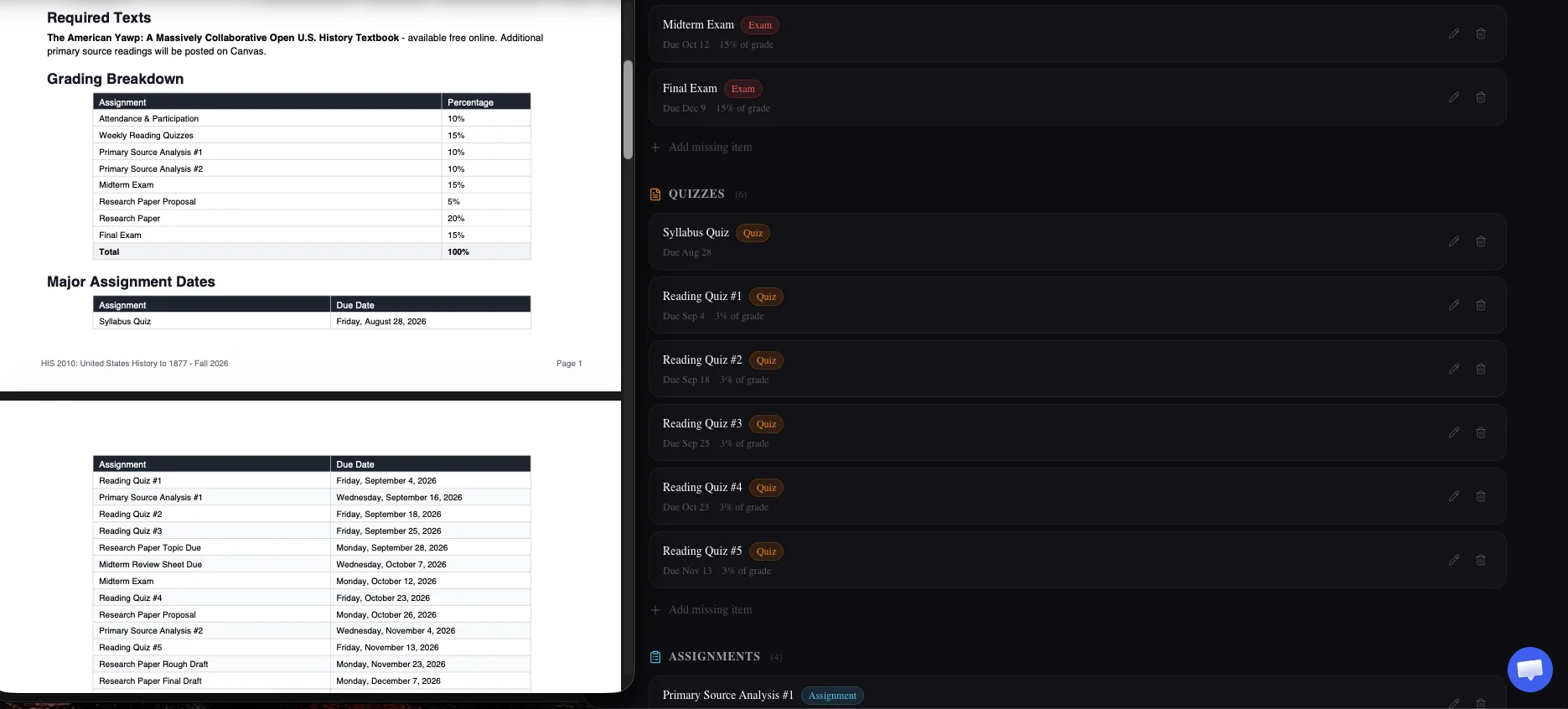
Two details do real work here. Recurring items get expanded — "weekly reading quiz" becomes twelve dated entries instead of one vague line. And dates that PassAI calculated rather than read get flagged as inferred, so when a syllabus says "Week 6" instead of a date, you know which handful to confirm with your professor rather than trusting all 16 equally.
It reads PDFs natively up to 10MB, Word .docx, and pasted text. It does not accept image files or Canvas links. It also will not write your papers, which is deliberate — the product plans your semester and tracks your grade, and stops there.
Every account starts with a 14-day Pro trial, no credit card; after it, the free plan keeps 2 classes with full grade tracking. Pro is $9.99/month, $24.99 for a 4-month Semester Pass, or $49.99/year; Scholar is $14.99/month.
Best for: students who want to know what a deadline is worth, not just when it lands.
Shovel — best if your school lives in Canvas or Moodle
Shovel takes a PDF syllabus or syncs directly with Canvas, Brightspace, Moodle, or Google Classroom, then builds your schedule from whichever source you give it.
The LMS sync is the real differentiator. If your professors genuinely keep Canvas current, pulling from it means your schedule updates when they change a date instead of going stale the moment the syllabus does. That is a meaningful advantage — with one condition attached.
The condition is that it inherits whatever your professors actually do. Sync to a Canvas page that is half-populated and you get a half-populated schedule. We wrote about why Canvas isn't enough on its own, and the short version applies here: the LMS is only as complete as the person maintaining it. Shovel's PDF path avoids that, so use it when your professors are unreliable and the sync when they are not.
Best for: schools where the LMS is genuinely well maintained.
UpAhead — best for raw speed
UpAhead advertises a populated schedule in 30 seconds, and pairs assignment tracking with a grade calculator. It now runs as a web app as well as on iPhone, syncs due dates from Canvas, Moodle, Blackboard and D2L, and sends reminders by text as well as email.
Speed is a real feature for this specific job, because the whole category exists to remove an afternoon of data entry. Thirty seconds is fast enough that you will actually do it for all five courses in one sitting, which is the failure point for most students — the tool that gets abandoned at course three has solved nothing.
The cost is the catch. The free plan covers one class, and Premium is $19 a month or $119 a year on the App Store, the most expensive option in this list. We compare cheaper options in the best UpAhead alternatives.
Best for: getting all five courses in before you lose interest.
Semora and Sylly — best for a paper syllabus and a phone
Semora and Sylly are iPhone-first apps that scan with your camera, which matters when the syllabus you were handed is on paper.
Semora pulls assignments, exams, quizzes, projects, and readings with due dates, times, and grade weights, usually in under a minute. It also syncs classes from Canvas, Blackboard or Moodle, free and unlimited, but the free plan includes only one AI syllabus scan in total. Pro is $4.99/month or $29.99/year and adds lecture recording, flashcards and a study plan. Sylly imports from camera, photo library, or PDF and extracts assignments and due dates.
Both are built for the iPhone first (Semora also has a web version), which is the tradeoff. If you do your actual planning on a laptop, a web app will fit your week better. If your syllabus arrived as a physical handout in a lecture hall, snapping a photo beats scanning it to PDF first.
Two smaller options sit in the same lane. SyllySync parses an uploaded syllabus PDF for important dates. Ovrit extracts deadlines, exams, and grade weights, and makes you review every item before it saves — a review step worth having, because extraction from a badly formatted syllabus is never perfect and the errors you catch in week one are free.
Best for: paper syllabi, and students who plan on their phone.
What about just using ChatGPT, Canvas, or Notion?
All three can do part of this job. None of them finish it, and the reason is the same each time: they do not keep the result.
ChatGPT will read your syllabus and list every deadline accurately. What you get is a block of text in a chat window. It does not persist as editable data, it does not update when a date moves, and it will not tell you in October about the paper you forgot in August. You would need to paste the output into something else, which puts you back at manual entry with an extra step in front of it.
Canvas already has some of your deadlines, and that is exactly the trap. It shows what your professor entered — often partial, frequently late, and occasionally padded with placeholder zeros that make your grade look worse than it is. The syllabus is the contract for the course. Canvas is a copy of it that somebody has to maintain, and the person maintaining it is grading 90 other students.
Notion is the best container on this list and still will not read your syllabus. You build the database, you type the dates, you maintain it. Students who love Notion usually love it in September and abandon it by midterms, because the maintenance cost never drops. We compared it honestly in PassAI vs Notion for students.
The pattern across all three: they are fine at holding a schedule and bad at producing one. Extraction is the work.
MyStudyLife — best free planner, but it does not read syllabi
MyStudyLife is free and well built: classes, homework, exams, smart reminders, rotating timetables, a Pomodoro timer, and grade tracking synced across devices.
It is on this list because it ranks for syllabus searches and students find it while looking for a scanner. It is not one. Every deadline is entered by hand, which puts you back in the afternoon of data entry the rest of this list exists to eliminate.
That is a fair trade if you want zero cost and rotating-timetable support, which is genuinely rare. Just go in knowing you are choosing a planner, not a scanner.
Best for: free, manual, rotating class schedules.
What to check before you commit
Pick on four questions, in this order:
- Does it extract grade weights, or only dates? This is the one that changes your week. Most stop at dates.
- Does it read your syllabus format? Native PDF reading preserves tables and footnotes. Apps that strip to plain text first lose the grading table, which is exactly where the weights live.
- Does it handle recurring items? "Weekly quiz" needs to become twelve dated entries. One vague line is not a schedule.
- Will you finish all five courses? A tool that takes ten minutes per syllabus gets abandoned at course three, and a schedule missing two classes is worse than no schedule, because you will trust it.
Pricing and features on all of these change — verify on each app's own site before you pay. And if you would rather do this manually first to understand what you are automating, how to read a syllabus covers the method by hand.
Start with the syllabus you are dreading most
Whichever you choose, run it on your heaviest course first — the one with the dense grading table and the deadlines scattered across a semester schedule. That is the syllabus where extraction saves you the most, and it is the honest test of whether an app is actually reading the document or just skimming the obvious dates.
If it comes back with the grading table intact and your recurring quizzes expanded into real dates, keep it. If it comes back with eight due dates and no weights, you have a calendar, not a plan.
You can also check where you stand right now with our free grade calculator, or see how automatic extraction works on the AI semester planner page.