To stay on top of assignments in college, put every deadline from every syllabus into one list in week one, attach the grade weight to each item, give every big assignment a start date, set your own deadlines 2 to 3 days early, and check the next two weeks every Sunday.
Here's each step, why it works, and the fastest way to do the boring part.
Why students fall behind (it's not laziness)
You fall behind because you can't see your whole workload at once. Your deadlines live in Canvas, three or four syllabus PDFs, a professor's announcement and a group chat. No single place shows all of them, so every assignment feels like a surprise, even the ones scheduled in week one.
It adds up fast. As an illustration, a syllabus with 2 exams, 6 quizzes and 8 assignments has 16 graded items. Five classes like that is 80 deadlines, which is a lot to hold in your head.
Having one list you actually look at goes a long way.
The five-step system for staying on top of assignments
The five steps are: collect every deadline in one place, attach grade weights, give big assignments start dates, set your own deadlines 2 to 3 days early, and review the next two weeks every Sunday. Here is how to do each one.
1. Collect every deadline in one place
Pull every assignment, quiz, exam and project from every syllabus into one list sorted by due date. This step decides whether the system works, because a list with one class missing feels complete right up until that class's paper is due.
You have three ways to do it:
- By hand. Go through each syllabus and type every item in. Free, but slow for five classes.
- From Canvas or Moodle. Canvas has a Calendar Feed link at the bottom right of its Calendar page. It covers every class at once, but only what each professor actually entered.
- From the syllabus itself. Upload your syllabus to an AI tool that reads the PDF and pulls out every dated item, including the ones buried in a footnote on page seven.
PassAI does both of the fast versions: paste your Canvas or Moodle feed link to bring in every class, then upload the syllabus to add grade weights to the same class. PassAI re-checks the feed every day, so a moved due date updates on its own.
2. Attach the grade weight to every item
Write the grade weight next to every deadline. A discussion post worth 2% and a midterm worth 30% shouldn't cost you the same effort, and on a night when both are due, the weight tells you which one to protect.
Canvas rarely shows weights, so you'll find them in the syllabus's grading breakdown. If you want the full method, here's how to prioritize assignments by grade weight.
3. Give every big assignment a start date
A due date tells you when something ends. It doesn't tell you when to start, and "start" is where students actually lose points.
Use these lead times for anything that's an exam or worth 15% or more of a class:
- Exams: start 7 days out.
- Finals and major projects: start 10 days out.
- In a crunch week (a week with several big deadlines), add 3 more days.
Those are the rules PassAI's Semester Map uses to tell you when to start. The reason they work: studying spread over several days sticks better than the same hours crammed into one night (distributed practice is one of two techniques rated high-utility in Dunlosky et al.'s review of 10 study methods), and in a crunch week the days right before the deadline are already taken by other deadlines.
4. Set your own deadline 2 to 3 days early
Treat the real due date as a wall, not a target. Aim to finish 2 to 3 days before it. That buffer absorbs whatever goes wrong: the upload that fails at 11:58, the night you get sick.
5. Review the next two weeks every Sunday
Ten minutes, every Sunday night. Look at what's due this week and next, and move anything that needs to start. If you also block out study time, do it in the same sitting; here's how to make a study schedule that survives past week two. This is the step that keeps the other four alive, because a list you don't look at goes stale in about two weeks, and a stale list is worse than none.
Find your crunch weeks before they find you
Lay your whole semester on one timeline and look for weeks where big deadlines collide. They often cluster around midterms and the last weeks of the term. Spotting them early gives you time to start the big items before that week arrives.
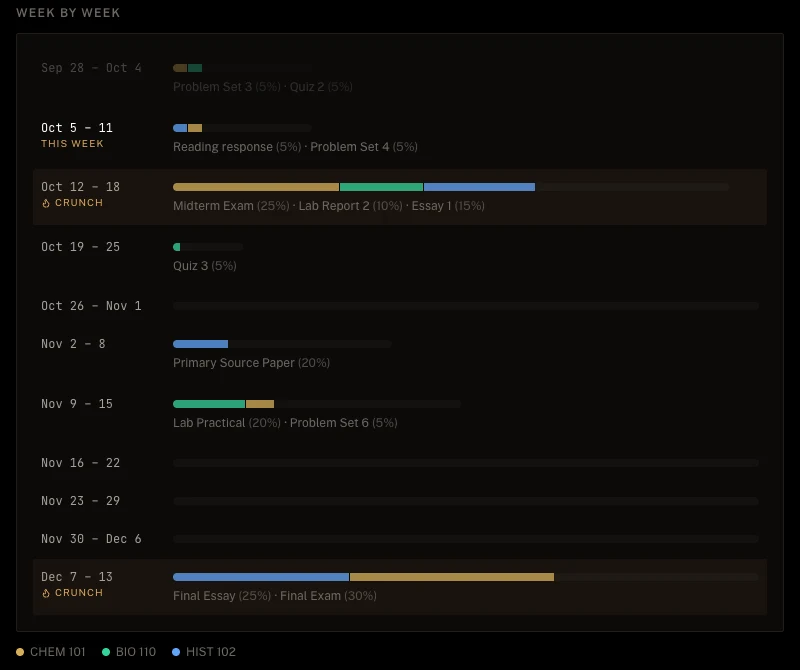
PassAI's Semester Map does this automatically. It puts every class on one timeline, flags the weeks that stand out against your own semester, and lists what to start early and when. It runs on every account, free or paid. If you'd rather do it by hand, a spreadsheet with one row per week and a column per class works too. It just takes longer.
Put your deadlines where you already look
The best tracker is the one you see without opening it. Two habits do that:
- Your phone's calendar. Subscribe your assignment list to Google Calendar, Apple Calendar or Outlook, and deadlines show up next to your classes and shifts. PassAI gives you one private calendar link for all of them, updated on its own.
- One morning email. A short list of what's due and what to work on today, read in 30 seconds before class. PassAI sends one each morning. On the free plan it covers 2 classes; Pro covers all of them.
Reminders help because they remove the step of remembering to go check.
The mistakes that sink most semester plans
Four mistakes kill most systems:
- Setting it up in week three. Weeks one and two feel calm, so people wait. By week three you're reacting, and the system never gets built.
- Tracking only some classes. A tracker missing one class makes you feel organized while hiding the class that blindsides you.
- Confusing a calendar with a tracker. A calendar shows dates. A tracker shows dates plus weights plus where you stand. If you can't tell which deadline matters most, you have a list, not a system. If you'd rather use an app, we compared seven in the best assignment tracker apps for college.
- Building it once and never looking again. The Sunday review isn't optional. Skip it twice and the list stops being true.
Week 1 checklist
Do this in the first week, while it's quiet:
- Download every syllabus, or ask the professor for any that aren't posted.
- Copy your Canvas or Moodle calendar feed link.
- Put every deadline in one list, using the feed, a syllabus reader, or your own two hands.
- Add the grade weight to every item from each syllabus's grading breakdown.
- Mark every exam and anything worth 15% or more, and give each one a start date.
- Look for weeks where major deadlines overlap.
- Subscribe the list to your phone's calendar.
- Put a recurring 10-minute "Sunday review" on your calendar.
A feed link and a syllabus reader make this much faster than typing everything by hand.
Where PassAI fits
PassAI runs this system for you. It reads your syllabi and Canvas or Moodle feed into one list with grade weights, maps your crunch weeks, tells you when to start the big items, and sends deadlines to your calendar and your inbox. It doesn't write your papers or do your homework; it makes sure you start them on time.
New accounts get a 14-day Pro trial with no card. After that the free plan keeps 2 classes; current paid plans are on the pricing page. If you'd rather build the system in Notion, our free Notion semester planner has the same steps built in, minus the automatic syllabus reading.