Our DormWay review in one line: DormWay is a free, well-built app that collects your deadlines from your syllabus and your LMS and puts them in one sorted list. It's a good pick if you're on an iPhone or Mac and mostly need to stop missing due dates. Where it stops is planning: DormWay tells you what's due and when, and leaves you to decide when to start. If you need that part done too, PassAI builds a dated study plan from the same syllabus. Everything below was checked on DormWay's own site and App Store listing on November 22, 2026.
TL;DR
- Price: $0, no card. A Pro plan is in development with no price yet.
- Best at: turning syllabi and Canvas, Brightspace, Blackboard or Moodle feeds into one list.
- Weak spots: no Android app, iOS 26 required, 3.1 stars from 10 App Store ratings, and no study schedule.
- Pick something else if: you need a plan with start dates, an Android app, or a mature app.
We make PassAI, which competes with DormWay, so weigh our verdict against the sources linked at the end.
Verdict: who the DormWay app is for
DormWay is for a college student on Apple devices whose professors keep Canvas up to date and whose main problem is scattered deadlines. If you check Canvas, your email and three PDFs to figure out what's due tomorrow, DormWay puts all of it in one place for free, and that alone is worth more than most paid planners.
It's a weaker fit in three situations:
- You're on Android. There's no Android app yet.
- Your problem is starting too late, not forgetting. A list sorted by due date shows you the midterm. It doesn't tell you to start on it 10 days out.
- You need it to work every day. DormWay is new, and its App Store reviews describe real bugs.
What DormWay does
DormWay collects your school life into one timeline. It was built at the University of Michigan by Riley Crimmins and Ethan Kaplan, and its about page says it has 60,000+ sign-ups across 11,000+ campuses. Here's what the app actually does:
- Reads your syllabus. Upload a PDF, Word file, spreadsheet, screenshot or photo, or forward it to syllabus@dormway.app. DormWay's syllabus analyzer pulls out assignments, exam dates, grading weights and the late policy, and links each item back to the page it came from.
- Imports your LMS. You paste a calendar feed from Canvas, Brightspace/D2L, Blackboard, Moodle, Google Classroom, Schoology or IvyLearn, and connect Google Calendar directly. Access is read-only, and no school approval is needed.
- Sorts what's due. The Tasks view groups everything by due date: overdue, today, this week. A semester view shows crunch weeks and back-to-back deadlines.
- Answers questions with DormWay AI. Its assistant, Ace, answers things like "When's my ECON 101 midterm?" from your syllabi and shows the source.
- Adds campus context. The Today page shows your next class, the room, what's due and the weather, plus term dates and dining halls at many schools.
DormWay also says, in its own footer, that it "does not complete or submit coursework for you." That's the right line for an academic app, and PassAI draws the same one.
DormWay pricing: is DormWay free?
Yes, DormWay is free. DormWay's pricing page lists $0 a year with no credit card, and the free core includes unlimited syllabus uploads, LMS feed imports, the AI syllabus analyzer, the assignment tracker and a GPA and grade calculator. There's no class cap, which is rare in this category.
The open question is Pro. DormWay says Pro is in development, isn't for sale, and will get features and a price "when it is ready." The page also says brand partnerships are "a later direction for the business" and that it never sells your data. So today it costs nothing, and you don't know yet which features will end up in Pro.
| DormWay | PassAI | MyStudyLife | Coursicle | |
|---|---|---|---|---|
| Free plan | Full core, no class cap | 14 days of Pro, no card, then 2 classes free | Free, with ads; holds 5 tasks at a time | Core features free |
| Paid plan | Pro planned, no price | $9.99/mo or $24.99 per semester | $6.99/mo or $39.99/yr | Optional Premium |
| Reads your syllabus | Yes, with grade weights | Yes, with grade weights | No | Yes |
| LMS | 7 calendar feeds | Canvas, Moodle | Lists Canvas and Blackboard | Canvas, Blackboard, Brightspace, Moodle, Sakai, Google Classroom |
| Dated study plan | Not advertised | Yes, by day with minutes | Not advertised | Not advertised |
| Platforms | Web, iPhone, iPad, Mac | Web (any phone browser) | Web, iOS, Android | Web, iOS, Android |
Competitor prices come from each app's own site or App Store listing, checked November 22, 2026.
What DormWay app reviews and Reddit say
DormWay's App Store listing shows 3.1 out of 5 from 10 ratings. Ten ratings is too few to judge an app by, so read what the reviews say rather than the score.
The positive reviews like the price and the focus. One reviewer called it a "really good app, no annoying in app purchases," and noted slow load times. The critical ones are about reliability. One describes classes showing up five times on the schedule and a task panel that didn't work. Another says it wouldn't link with Canvas or Google Calendar and that deleting the account was hard. DormWay replied to each and says it fixed the duplicate-class bug.
On Reddit, the most visible thread is the founder's own launch post on r/uofm asking Michigan students for feedback. We didn't find independent DormWay Reddit reviews when we searched on November 22, 2026. Capterra and Software Advice both list DormWay, but neither showed us a rating we could cite. So, for now, the App Store is the only public review data.
A note on other comparisons: Coursicle's DormWay comparison (August 2026) calls DormWay an iOS app that syncs Canvas, Blackboard and Moodle. That's out of date. DormWay now runs on the web too and lists seven LMS feeds.
Where DormWay falls short: it gives you a list, not a plan
DormWay's weakest point is the one its own App Store description names: it "shows you what's due in one list." The list is good. It reads the grade weights and it flags crunch weeks. But a list sorted by due date still leaves the hard decision to you: when to start, and how many hours each exam gets.
Here's a worked example with three real midterms in one week:
| Exam | Date | Weight |
|---|---|---|
| Calc II midterm | Sat, Nov 28 | 25% |
| Bio 101 midterm | Mon, Nov 30 | 20% |
| History midterm | Tue, Dec 1 | 15% |
In a list app, these show up as three items due in a heavy week, sorted by date. You know they're coming. You still have to work out that Calc needs the most time because it's worth 25% and you haven't started, and that "this week" is already too late to begin.
In PassAI, the same three exams become a schedule. At 3 study hours a day, PassAI's free exam study plan generator gives Calc II 11.5 hours, Bio 7 and History 3.5, and, when we ran it on Sunday, Nov 22, started Calc and Bio that same day, six days before the first exam:
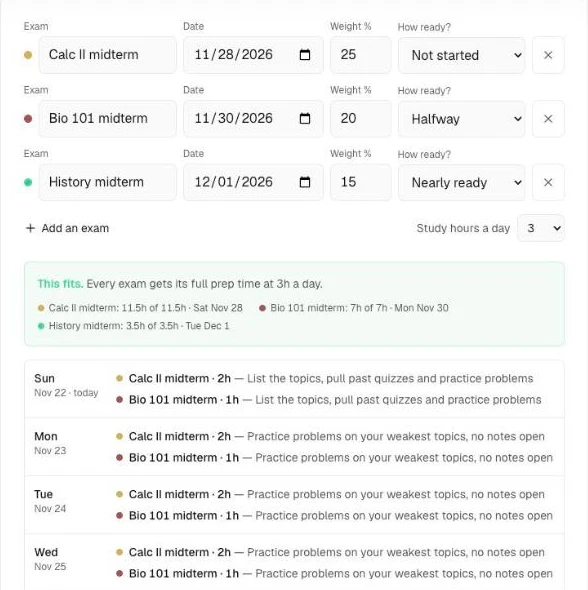
That's the difference. Inside the app, PassAI does the same from your uploaded syllabus: every exam and anything worth 15% or more gets a start date (7 days before an exam, 10 before a final or project, 3 days earlier when it lands in a crunch week), and the study plan gives each day a task with an estimated number of minutes. Why it matters: most bad grades in a crunch week come from starting the 25% exam at the same time as the 15% one, not from forgetting it exists.
DormWay does have a "Break it down" feature that splits one task into steps. We couldn't find DormWay saying it schedules study sessions across the days before an exam. Treat that as "not advertised," not "impossible."
The other limits:
- No Android app. Web, iPhone, iPad and Mac only, with Android "coming soon."
- iOS 26 required. Phones that can't update to iOS 26 can't install the app, though the web version still works.
- LMS feeds only see what's posted. If your professor posts the week 8 midterm in week 7, the feed won't have it until then. The syllabus upload covers that gap, but only if you upload it.
- Pro is unknown. You can't yet tell which features will stay free.
DormWay vs MyStudyLife
DormWay fills itself in and MyStudyLife doesn't, so if you hate typing deadlines, DormWay wins. MyStudyLife has no syllabus reading, so you enter assignments and exams by hand, and MyStudyLife's site says free accounts hold up to 5 tasks at a time. MyStudyLife+ removes that for $6.99 a month or $39.99 a year.
MyStudyLife wins on maturity and reach: 4.5 stars from 6,200 ratings, native Android, and rotating A/B and block schedules that most college planners skip. If you're on Android, that settles it. DormWay's own DormWay vs MyStudyLife post admits the same. For more options in that lane, see our MyStudyLife alternatives.
DormWay alternatives by situation
The right DormWay alternative depends on what DormWay didn't do for you.
1. You need a plan, not a list: PassAI
PassAI reads your syllabus and turns it into a study plan. Upload a PDF, Word file, up to 8 photos or pasted text. PassAI pulls every assignment, quiz and exam with its due date and grade weight, flags dates it wasn't sure of (like "week 10") on a review screen, and then plans from there:
- PassAI's study plans give each day before an exam a dated task with minutes.
- PassAI's Semester Map puts every class on one timeline and marks the crunch weeks, with a start date on every exam and anything worth 15%+.
- PassAI's morning email lists what's due today and tomorrow, so you don't have to open an app to stay on track.
- A calendar link puts everything in Google, Apple or Outlook Calendar, and a Canvas or Moodle feed is re-checked daily, so a moved date shows up on its own.
On a real US history syllabus, that came to 16 graded items (2 exams, 6 quizzes, 8 assignments), every weight filled in. Won't do: run as a native phone app (it works in your phone's browser), sync Blackboard or Brightspace yet, or write your assignments. Every account gets 14 days of Pro with no card, then 2 classes stay free. See how it compares to others on our compare page.
2. You need Android or registration tools: Coursicle
Coursicle's core is free: schedule builder, professor reviews, syllabus uploads and assignment sync from six LMSs, on iOS, Android and the web. It also covers registration, which DormWay doesn't. More detail in our Coursicle alternatives roundup.
3. You have a rotating schedule: MyStudyLife
Mature and on every platform, with 4.5 stars from 6,200 App Store ratings. You type in your coursework, and the free plan holds 5 tasks at a time, so it suits students who'd rather control every entry or are willing to pay for MyStudyLife+.
4. You want to check every date first: Classmaite
Classmaite shows a review-and-edit screen before anything reaches your calendar. One syllabus is free with no account; Pro is $9 a month or $29 a semester, and its 3-day trial needs a card.
If you came here from a different app, our Syllabuddy alternatives covers the rest of the syllabus-scanner field.
Should you use DormWay?
Use DormWay if you're on an iPhone or Mac, want your deadlines collected for free, and already know how to pace your studying. Install it, upload one syllabus, and check what it pulled against the PDF before you trust it, because every syllabus reader misreads something eventually.
If you keep starting the big exams too late, you need a plan more than a list. Upload the same syllabus to PassAI and see the dated schedule it builds before you decide. The trial is 14 days, with no card.
Sources
- DormWay: Pricing, home page and FAQ, About, DormWay vs MyStudyLife
- DormWay on the App Store (rating, reviews, requirements)
- MyStudyLife and MyStudyLife on the App Store
- Coursicle: DormWay vs Coursicle and What is Coursicle?
- Classmaite pricing