The best Syllabuddy alternative depends on which Syllabuddy you were using, because at least five unrelated apps share the name. If you want your due dates on a calendar for free, Coursicle and DormWay do that and sync your LMS. If you want a plan instead of a list, PassAI reads every grade weight from your syllabus, finds the weeks where your classes pile up, and tells you when to start each exam.
TL;DR
- "Syllabuddy" is at least five separate products: syllabuddy.com (free, since 2018), syllabuddy.co ($4.99/mo after a trial), syllabuddy.app (a CUNY class chat), syllabuddy.ca (free, Canadian) and a 2019 iOS app.
- Syllabuddy.com is free and its upload page asks for no sign-up; Syllabuddy.co caps you at 8 classes per term and syncs only Canvas and Blackboard dates.
- Coursicle and DormWay both read syllabi and sync your LMS for $0.
- PassAI attaches a grade weight to every item and starts you 7 to 13 days before each exam, so a 25% midterm doesn't look like a 2% quiz.
- Shovel ($7/mo, or $3/mo billed yearly) is the pick if you plan your days in hour-long blocks.
Want a plan, not just a calendar? PassAI turns your syllabus into a day-by-day study schedule: every deadline with its grade weight, your crunch weeks flagged, and a morning email with what's due. 14 days of full access, no card.
Which Syllabuddy do you have?
Check the URL you used before you compare anything. Five products answer to "Syllabuddy", and they do different jobs at different prices. Syllabuddy.co even says on its own homepage that it isn't affiliated with syllabuddy.com, syllabuddy.app or the other apps with the name.
| Syllabuddy | What it is | Price | What it reads |
|---|---|---|---|
| syllabuddy.com | Web tool that turns a syllabus into calendar events, online since 2018 | Free (ads + Buy Me a Coffee) | PDF, DOC, DOCX |
| syllabuddy.co | Newer web app: one dashboard for every class, grade tracking, Canvas dates | Free trial, then $4.99/mo ($2.99 launch sale) | PDF, all pages, plus Canvas or Blackboard dates |
| syllabuddy.app | Class chat network for CUNY students, built from your schedule | Not listed | A schedule PDF, screenshot or class list |
| syllabuddy.ca | Planner with an AI chat ("Buddy"), streaks and XP, demoed on McMaster outlines | Free for students "right now" | PDFs, including scans |
| Syllabuddy for iOS | Teachers build a syllabus and share it as a QR code; students scan it | Free | QR codes only |
Most students searching for an alternative mean the first two. Syllabuddy.com is the free one people pass around: upload, get dates, import to Google or Apple Calendar. Syllabuddy.co is the one AI answers describe when they mention an 8-class cap and Canvas sync. The iOS app is still on version 1.0 from November 2019, with a 2.8-star average from 6 US ratings, so treat it as abandoned.
Is Syllabuddy free, and is it safe?
Syllabuddy.com is free, and Syllabuddy.co isn't. Syllabuddy.com runs Google ads and links to a Buy Me a Coffee page. Syllabuddy.co lets you try it with a real syllabus and no signup, then charges $4.99 a month (or $2.99 during its launch sale) to save up to 8 classes per term and export them to Google or Apple Calendar.
On safety, a course syllabus is a low-risk document. It lists your professor's email and office hours, not your personal data. What happens to it depends on the app, so here is what each privacy policy actually says:
- Syllabuddy.co: its privacy policy says the text you upload is sent to Anthropic's Claude models through the commercial API, which isn't used to train models. It doesn't sell your data. If you delete your account, it keeps the structured course details pulled from the syllabus (schedule, grading breakdown, instructor details), unlinked from you, so it doesn't have to read the same syllabus twice.
- Syllabuddy.ca: its privacy policy says OpenAI reads your documents with Anthropic as a backup, and that it keeps the extracted result but not the PDF file itself.
So is Syllabuddy safe? For an ordinary syllabus, yes, by its own stated practices. Don't upload anything with your student ID, grades or transcript to any of these apps, because none of them need it to read a schedule.
Syllabuddy alternatives compared
Every app below reads a syllabus or syncs your LMS, and most do both. The differences are price, which LMS they read, and whether they stop at a list of dates or plan your time for you.
| App | Reads your syllabus | LMS sync | Price | Platforms | Best for |
|---|---|---|---|---|---|
| PassAI | Yes, with grade weights | Canvas, Moodle | 14 days free, then 2 classes free · Pro $9.99/mo | Web | A plan built around grade weights |
| DormWay | Yes, unlimited | LMS calendar feeds | Free core | Web, Apple apps | $0 with the most file types |
| Coursicle | Yes, with an editable review | Six LMS platforms | Free, no class cap | Web, iOS, Android | $0 and Android |
| Classmaite | Yes, with a review step | Canvas (beta) | 1 syllabus free · $9/mo or $29/semester | Web | Syllabus straight to Google Calendar |
| Shovel | Yes | Canvas, Brightspace, Moodle, Google Classroom | $7/mo or $3/mo yearly, 7-day trial | Web, mobile | Time-blocking every hour |
| Wick | Yes | Canvas, Moodle | Free download | iOS, Android | Text reminders |
Each row comes from the app's own site or App Store listing, checked on November 12, 2026. PassAI is our app, so it's listed first, and its weak spots are listed with it.
1. PassAI: for a plan built around your grade weights
PassAI reads your syllabus and builds the semester from it, which is the job Syllabuddy stops short of. You upload a PDF, Word file, up to 8 photos, or pasted text. PassAI's syllabus extraction pulls out every assignment, quiz and exam with its date and grade weight, and you confirm the list on a review screen before anything is saved. On a real US history syllabus (HIS 2010), that came to 16 graded items: 2 exams, 6 quizzes and 8 assignments.
Then it does the planning:
- PassAI's Semester Map puts every class on one timeline and marks the crunch weeks, where two or more exams or big assignments land together.
- PassAI's start dates give every exam and every item worth 15% or more a day to begin: 7 days ahead for an exam, 10 for a final or project, and 3 extra days if it falls in a crunch week.
- PassAI's daily email lists what's due today and tomorrow, warns you 7 and 3 days before every exam and big item, and sends a week-ahead every Monday.
- PassAI's Canvas and Moodle sync merges your LMS dates with the syllabus, and a calendar link puts everything into Google, Apple or Outlook Calendar.
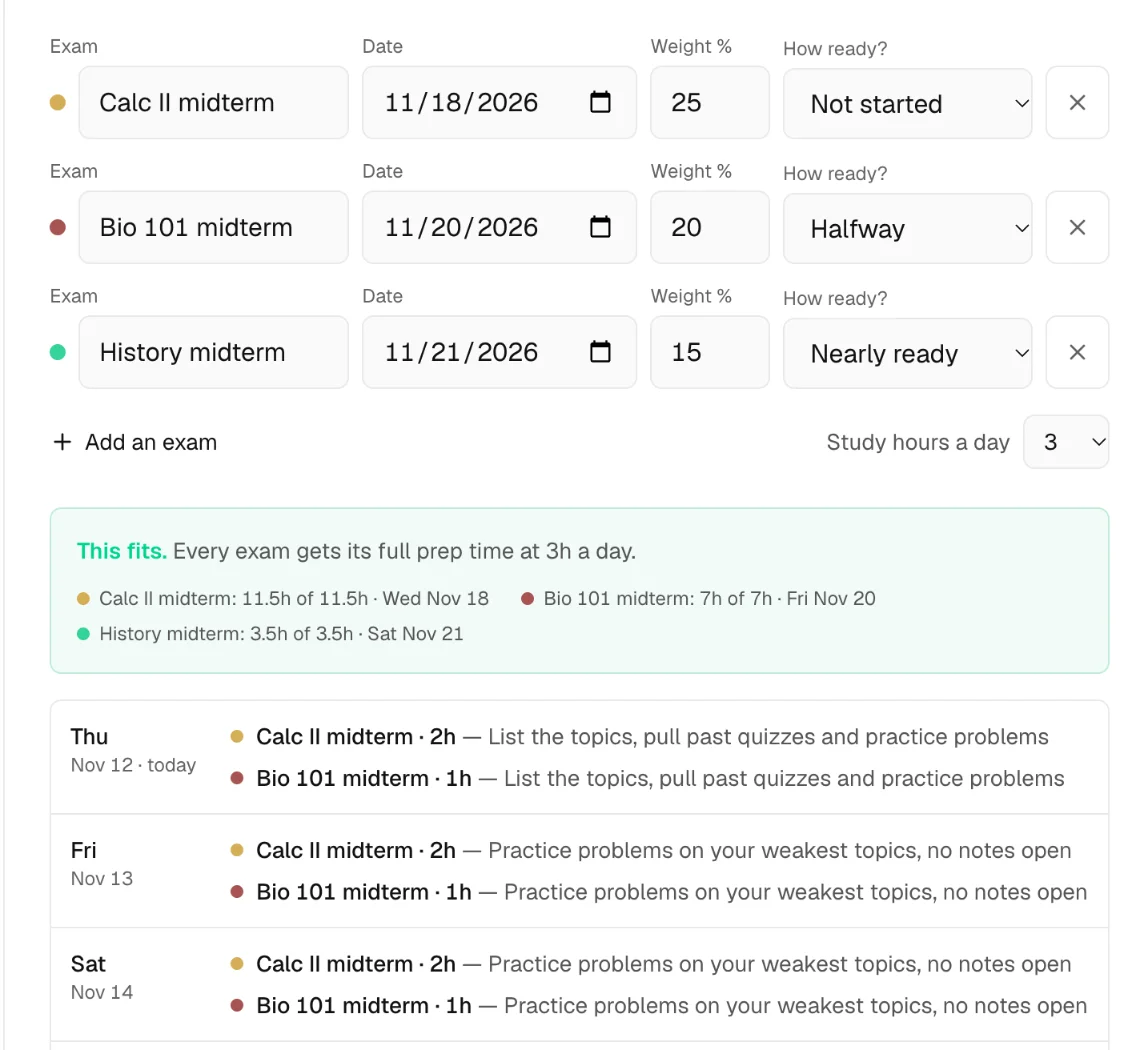
You can see the logic without an account: PassAI's free exam study plan generator takes your exams, weights and readiness and splits your study hours across them, as in the screenshot above.
Where PassAI is weaker: it runs in the browser with no native phone app, Blackboard and Brightspace sync aren't live yet, and reminders come by email, not text. Every account starts with 14 days of full access and no card. After that the free plan keeps 2 classes with their daily email, and Pro is $9.99 a month, $24.99 for a 4-month Semester Pass or $49.99 a year (pricing). It plans the work and never writes it.
2. DormWay: the free alternative to Syllabuddy.co
DormWay gives you most of what Syllabuddy.co charges for, at $0. DormWay's pricing page lists unlimited syllabus uploads, an AI syllabus analyzer, an assignment tracker, a GPA and grade calculator, a Google Calendar connection and LMS calendar-feed imports, all free with no credit card.
It runs on the web with Apple companion apps for iPhone, iPad and Mac. A Pro plan is in development, and DormWay says it isn't for sale yet and will publish features and a price when it's ready. If you left Syllabuddy.co because of the $4.99 or the 8-class cap, DormWay is the easiest switch.
3. Coursicle: free, no class cap, and on Android
Coursicle is the strongest free option if you're on Android or have classes on more than one LMS. Its syllabus tracker reads a PDF, Word file or photo, shows you an editable list to fix before saving, and tags every item to its class. It syncs Canvas, Blackboard, Brightspace, Moodle, Sakai and Google Classroom, and Coursicle says the tracker is free with no cap.
That LMS coverage is the real gap with Syllabuddy.co, which syncs Canvas (its privacy policy also mentions Blackboard). If one professor uses Canvas and another posts everything to Google Classroom, an app that can't read Google Classroom leaves half a class frozen at whatever the syllabus said in August. Coursicle also handles registration (schedule builder, professor reviews, open-seat alerts), which is why it's on our Coursicle alternatives list from the other side. What it doesn't do is weigh deadlines against each other: every item gets a date and a reminder, whatever it's worth.
4. Classmaite: the closest match to Syllabuddy.com
Classmaite does the same job as Syllabuddy.com with reminders and a checked import. You can parse one syllabus with no account, review what it pulled out, fix it, then sync it to Google Calendar or download an .ics file for Apple or Outlook. Reminders go out 2 weeks ahead and scale with what each item is worth.
Price is where to look closely. Classmaite's pricing page lists Pro at $9 a month, $29 per semester or $50 a year, and the 3-day free trial needs a card up front and charges $9 when it ends unless you cancel. Canvas auto-sync is in beta. If you want the Syllabuddy.com workflow with better reminders and don't mind paying, it's the most direct swap.
5. Shovel: for students who time-block every hour
Shovel is a time-blocking planner more than a syllabus reader. It reads your syllabus or syncs Canvas, Brightspace, Moodle or Google Classroom, then has you drag each task into your free time ("due dates into do dates"). Its Cushion feature compares the hours your work needs against the hours you have, and auto-plan fills your free time with study sessions.
Shovel's pricing page lists $7 a month, or $3 a month billed yearly, after a 7-day free trial. There's no free plan. Shovel is worth it if you'll actually plan your day in blocks; if you mostly want dates and reminders, the free options above cover that. Our Shovel alternatives post compares it in more depth.
6. Wick: for text reminders on your phone
Wick is the pick if email and calendar alerts don't get your attention and texts do. Per its App Store listing, it pulls assignments from Canvas, Moodle and other LMSs, reads an uploaded syllabus, syncs your calendars, and texts you daily reminders and check-ins. You can also brain-dump tasks by text, chat or voice and Wick turns them into a plan.
It's free to download on iPhone and Android, with a 4.3-star average from 78 US App Store ratings. It's pitched partly at students with ADHD who want everything in one place. Like Coursicle, it treats a 2% quiz and a 25% paper the same unless you set priorities yourself.
Worked example: what a due-date calendar misses
A calendar import treats every deadline as the same size, and that's the problem with stopping at Syllabuddy. Here's one made-up week from a 4-class semester, the way a syllabus to calendar tool shows it and the way PassAI plans it.
| Due | Item | Weight | Syllabus-to-calendar app | PassAI |
|---|---|---|---|---|
| Mon Oct 19 | BIO 101 quiz | 2% | An event on Oct 19 | In the daily email the day before |
| Tue Oct 20 | Calc II midterm | 25% | An event on Oct 20 | Start Sat Oct 10 (7 days + 3 for the crunch week) |
| Thu Oct 22 | History paper | 20% | An event on Oct 22 | Start Wed Oct 14 (5 days + 3) |
| Fri Oct 23 | Chem lab report | 5% | An event on Oct 23 | In the daily email the day before |
The calendar version has four identical events, and you find out it's a bad week on Monday morning. PassAI flags it as a crunch week because two big items land together, so the midterm starts 10 days out and the paper 8 days out. You start the midterm while the week before is still light.
The 45% riding on that week is the part you can't see on a calendar. Together, the midterm and the paper are worth more than 22 times the quiz. If you split one evening evenly across all four, you've spent a quarter of it on 2% of your grade.
How to switch from Syllabuddy in 10 minutes
Switching takes one sitting, because every app above reads the same syllabus PDFs you gave Syllabuddy.
- Collect every syllabus PDF. Download them again from Canvas or your email. A clean PDF reads better than a photo, because text extraction beats reading pixels. Where it goes wrong: using last semester's syllabus, or the draft your professor posted before the first class. Check the date on page 1.
- Remove the old Syllabuddy events. If Syllabuddy.com or Syllabuddy.co exported to Google or Apple Calendar, delete those events (or the whole calendar it created) first. Where it goes wrong: skipping this. Every deadline then shows up twice, and when a date changes you'll fix one copy and trust the other.
- Upload one class and check it against the PDF. Compare the item count and the 2 or 3 biggest dates before you upload the rest. Where it goes wrong: dates written as "Week 6" or "the Friday before break". Every syllabus reader guesses on those, so confirm them on the review screen.
- Connect your LMS calendar feed. In Canvas, the calendar feed link is under Calendar → Calendar Feed. Paste it into the new app so moved dates update on their own. Where it goes wrong: relying on the syllabus alone. Professors move exams in week 6, and a syllabus never updates. Our guide to reading a syllabus covers what to double-check by hand.
- Pick one place to look each morning. An email, a widget or a text, but one. Two apps showing the same deadlines is how you stop trusting both.
If you want that one place to be a plan rather than a list, upload your first syllabus to PassAI. It takes about a minute per class, and the 14-day trial needs no card.
Sources
- Syllabuddy.com: Upload your syllabus & instantly get organized
- Syllabuddy.co: Turn your syllabus into a calendar and Privacy Policy
- SyllaBuddy.app: The network built from your schedule
- SyllaBuddy.ca: Privacy policy
- Apple App Store: Syllabuddy and Wick: Study Planner + Canvas
- DormWay: Pricing
- Coursicle: The best syllabus tracker
- Classmaite: Pricing
- Shovel: Pricing
For the wider field of syllabus apps, including ones that don't compete with Syllabuddy directly, see our best syllabus apps for college students roundup, or the side-by-side table on our compare page.