Your Canvas grade says 91%. You have not, in your gut, been doing 91% work. Somewhere between those two facts is a number that actually tells you where you stand, and Canvas is not showing it to you.
Here's the short version. By default, Canvas calculates your grade using only the assignments that have already been graded. Everything still ungraded — the final worth 30%, the paper you haven't turned in, the quizzes not yet marked — is left out of the math completely. That number is called your Current Grade, and it is a report on your past, not a forecast of your semester.
Current Grade vs Final Grade: one checkbox changes everything
Open your grades page in Canvas and look at the right-hand side. There's a checkbox: "Calculate based only on graded assignments."
It is checked by default. That gives you the Current Grade.
Uncheck it and the number changes, sometimes dramatically. Now you're looking at the Final Grade — Canvas recalculates as though the semester ended today, giving you a zero for every assignment that hasn't been graded. This behavior is documented by university IT departments across the country, including Penn State, Florida State, and Ohio State.
Neither number is lying. They answer different questions:
- Current Grade answers: how have I done on the work that's been scored?
- Final Grade answers: what would I get if I submitted nothing else, ever?
In week four of the semester, the first number is optimistic and the second is catastrophic, and neither one is what you actually want to know. What you want to know is somewhere in between, and it requires a third piece of information Canvas doesn't put on the screen.
One more wrinkle worth knowing: students regularly report that the checkbox doesn't stay unchecked between visits. So even if you deliberately switch views, you may be back to the default the next time you log in without noticing.
Why your Canvas grade drops as the semester goes on
This is the pattern that catches people, and it isn't your imagination.
Early in the term, the only things graded are small: a syllabus quiz, attendance, a first homework set. These are usually easy, so your average sits high. Because Canvas divides only by the weight of what's been graded, that small, easy sample is your grade.
Then the midterm gets scored. Suddenly a single assignment carrying 25% of the course enters a calculation that previously only contained 8% worth of easy points. If you scored below your existing average, your grade doesn't nudge — it lurches.
Nothing about your performance changed on the day the grade moved. The sample changed. Understanding that is the difference between panicking in week seven and knowing exactly what week seven means.
What Canvas doesn't show: how much is still on the table
Here's the number that makes everything else interpretable: how much of your grade is still unscored.
A 92% with 80% of the course still ungraded and a 92% with 5% still ungraded are completely different situations. The first is barely information. The second is nearly a final answer. Canvas displays them identically.
This is the gap. Canvas is a gradebook — a record of what has been scored. It was built for the professor entering the scores, and for that job it works fine. It was never built to answer "am I okay?", which is the only question you're actually asking when you open it.
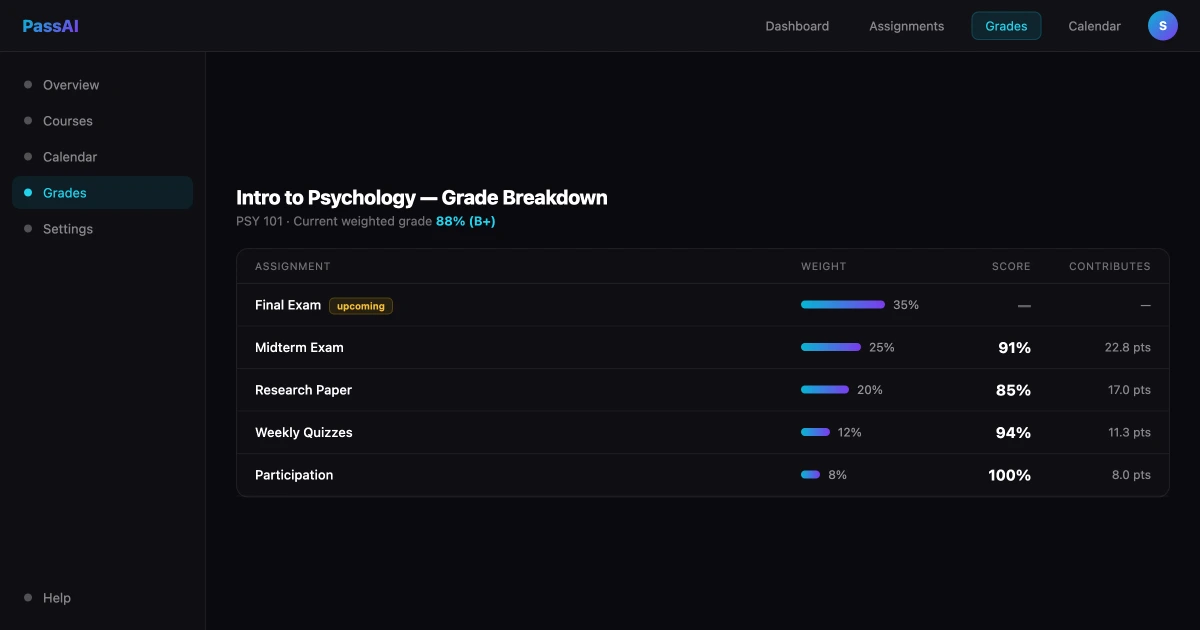
PassAI shows the weight column next to every assignment, along with how much of the course has been graded so far. Same underlying math as Canvas's Current Grade — we're not claiming to compute a truer number — but with the context that tells you how much that number is worth.
How to work out what you need on what's left
You can do this by hand. It takes about two minutes and a calculator.
Step 1 — Write down the weights from your syllabus. Take the biology class in the screenshot above:
| Category | Weight |
|---|---|
| Homework | 15% |
| Lab Reports | 15% |
| Quizzes | 10% |
| Midterm | 20% |
| Final Exam | 40% |
Step 2 — For each graded item, multiply your score by its weight. Homework is averaging 88%, labs 85%, quizzes 70%, and the midterm came back at 78%:
- Homework: 0.88 × 15 = 13.2 points
- Lab Reports: 0.85 × 15 = 12.8 points
- Quizzes: 0.70 × 10 = 7.0 points
- Midterm: 0.78 × 20 = 15.6 points
Step 3 — Add them up. That's 48.6 points earned, out of the 60 points of weight that have been graded.
Step 4 — Divide. 48.6 ÷ 60 = 81%. That's your Current Grade, and it's what Canvas shows you.
For contrast, the Final Grade — the same 48.6 points divided by the full 100 — is 48.6%. An F. Both numbers describe the identical situation.
Step 5 — Now the useful part. You have 40 points of weight left, all of it the final. To finish the course at a B (83%), you need 83 total points. You have 48.6. So you need 34.4 more from 40 available:
34.4 ÷ 40 = 86% on the final.
That is a real, actionable number. It's the one you should be carrying around, and it's the one no Canvas screen will ever hand you.
PassAI's grade calculator runs this on every class at once, off the weights it pulled from your syllabus, so the remaining-weight math stays current without you redoing it every few weeks.
When a target grade becomes mathematically impossible
Run that same calculation for an A− and something important falls out.
An A− needs 90 total points. You have 48.6, so you'd need 41.4 points out of a final worth 40. There aren't 41.4 points there to take. Expressed as a score it's a little over 103% — which is another way of saying the A− is gone. Not unlikely, not difficult: arithmetically unavailable. Even a perfect final tops the course out at 48.6 + 40 = 88.6%.
Knowing this in week nine is genuinely useful. It stops you from burning yourself out chasing a grade that stopped existing weeks ago, and it lets you put that effort into a class where the ceiling is still high enough to matter.
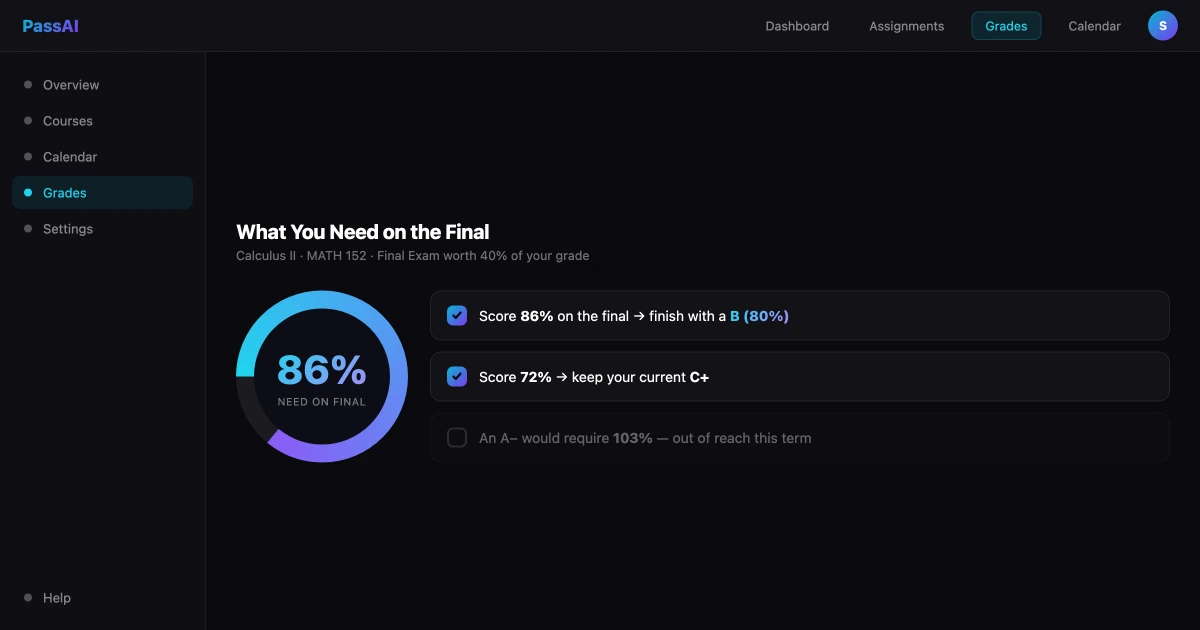
PassAI runs this check automatically for every target and flags the ones that are out of reach, rather than quietly returning a number above 100 and letting you work out what it means.
The assignments Canvas doesn't know exist
There's a failure mode underneath all of this that no amount of careful math will fix.
Canvas can only calculate using assignments that exist inside Canvas. If your professor listed a reading response in the syllabus PDF and never created it in the system, it isn't in your grade — and it isn't in your weights either. Your denominators are wrong and you have no way to tell.
We wrote about this at length in why Canvas isn't enough for college students, and it's the reason PassAI works from your syllabus rather than from the LMS. The syllabus is the document that actually defines the course. Canvas is one professor's partial transcription of it.
Read your grade in 60 seconds
A checklist for the next time you open Canvas and feel your stomach drop:
- Check the box. Find "Calculate based only on graded assignments" and note whether it's checked. It probably is.
- Uncheck it once. Look at the Final Grade. Don't panic — you're seeing a world where you submit nothing else. Check it again.
- Ask what's been graded. Open the assignment list and add up the weight of everything with a score. That percentage is how much your grade is actually based on.
- Ask what's left. 100 minus that number is your remaining weight. This is your leverage.
- Do the subtraction. Target grade minus points earned, divided by remaining weight. Above 100 means it's out of reach.
- Check the syllabus against Canvas. Anything on the syllabus that isn't in Canvas is a hole in every calculation above.
None of this requires a tool. It requires knowing that Current Grade and Final Grade are different questions, and that the number Canvas leads with answers neither of the ones you care about.
If you'd rather not run it by hand every few weeks, that's what PassAI is for — you upload the syllabus, it pulls the weights and deadlines out, and the grade view keeps the remaining-weight math current on its own. Free to start, no card. But the arithmetic above is yours either way, and it works on paper.
Related reading: Why Canvas Isn't Enough for College Students · How to Improve Your GPA in College · How to Calculate Your GPA · How to Stay on Top of Assignments