The best Notion AI alternatives for students depend on what you need: Google's source-based notebook for studying readings, ChatGPT for back-and-forth explanations, Gemini for guided learning, and PassAI for syllabus deadlines and grade weights. You can keep Notion for notes while using a separate tool for those jobs.
An AI subscription feels expensive when you only need one feature. Before switching, name the thing you actually use it for. Searching your class notes is different from getting help with chemistry. Neither guarantees that you'll remember the lab report due Friday.
Choose a Notion AI alternative by the task
Start with the task that keeps breaking during your week. A chatbot that explains derivatives won't automatically maintain your assignment database, and a deadline planner won't replace a searchable library of lecture notes.
| Option | Start here when you need… | Free access | What you still handle |
|---|---|---|---|
| Google's source-based notebook | Answers tied to your readings and notes | Standard tier available; usage limits apply | Choosing and updating source material |
| ChatGPT | A tutor you can question as you work | Free plan; separate tool limits | Supplying course context and saving useful answers |
| Gemini | Guided explanations with file or visual context | Access and limits depend on account and plan | Checking feature availability and keeping your task list current |
| PassAI | Syllabus dates, grade weights, and a semester view | 14-day Pro trial; then 2 classes, daily email, free grade tracking | Reviewing extraction and correcting changed course details |
None of these is a complete replacement for Notion's editable workspace. If you depend on Notion AI changing database rows in place, check that capability before switching. Copying a chatbot's answer into a page is a different workflow.
This is a comparison of documented capabilities, with suggested study tasks you can try. It isn't a timed performance test. PassAI makes one of the products below; its limits belong in the comparison too.
1. Google's source-based notebook: for studying assigned material
Use Google's notebook tool when you need an answer you can trace to a reading. Google's current help pages call it Gemini Notebook; you may know it as NotebookLM, whose address now redirects to notebook.google.com.
According to Google's notebook documentation, you can add PDFs, websites, and other sources, then ask questions with inline citations. It can also turn sources into study guides and audio overviews. A Standard tier is available free of charge, with usage limits and paid upgrades.
For a history seminar, add the assigned chapter and your lecture notes to one notebook. Ask which points in the lecture the chapter supports, then open the cited passages. That gives you something to check when the wording sounds suspiciously confident.
Try this prompt with material you're allowed to upload:
Using only these sources, explain the disagreement between the two authors. Cite the passages for each position. Identify anything my notes leave unclear.
Its advantage here is the connection to the source text. Read the passages yourself before relying on the answer. A citation tells you where to check; it doesn't finish the checking.
Keep your assignment schedule elsewhere. A useful summary of chapter 6 doesn't tell you whether your professor moved the response-paper deadline. Update the notebook when course materials change, and keep the current assignment instructions attached to the work you're doing.
2. ChatGPT: for working through a difficult concept
ChatGPT is a practical substitute when your main use of Notion AI is asking follow-up questions. You can take an explanation apart, try a problem, and ask about the step you missed.
OpenAI's study-mode guide says the feature is available across plans and can guide you with questions, explanations, and checks for understanding. It can use uploaded course materials when uploads are available in the chat. Free accounts also support file uploads, subject to limits.
For a chemistry problem, show your attempt and identify the line where you got stuck. Asking for another full solution makes it too easy to read along and mistake recognition for understanding.
Use a prompt like this:
I'm studying introductory chemistry. Here's my attempt at this practice problem. Ask me one question about my next step, wait for my answer, and explain any mistake before we continue.
You still need to bring the relevant context. Include the method your professor teaches if the class requires it. Check the response against your worked examples, because a correct-looking explanation can use an approach your course hasn't covered.
Save the useful explanation in your class notes after the session. Using ChatGPT separately doesn't make its answers appear in Notion or keep your Notion assignments current. You can copy material across, but you own that step.
Follow your course's AI rules, especially when a practice exercise resembles graded work. Our guide to using AI in college without cheating covers the questions to ask before you use a tool on an assignment.
3. Gemini: for guided learning with files and visual aids
Try Gemini when you want guided explanations and already use a Google account for schoolwork. Google's learning-tools guide describes Guided Learning, file attachments, and visual aids. Some learning features have additional age, region, or account restrictions, so check what's available in your account.
For biology, give Gemini the diagram or lecture excerpt you're studying. Ask it to explain one process, then test you on the parts you confuse. Start with a narrow topic; “teach me biology” gives it almost no useful boundary.
For example:
Help me understand this diagram of cellular respiration. Start with the role of the mitochondrion. After I explain it back, point out what I missed and ask the next question.
Gemini also supports uploading and analyzing files. Upload and analysis limits apply, and Google warns that large files can lead to missed details. Use the relevant slides or pages for a focused question instead of attaching every document from the semester.
Gemini and Google's source-based notebook serve different study habits. Choose the notebook when your priority is comparing specific readings with citations. Try Gemini when you want a conversation about a concept or diagram. You don't need both open for every study session.
A Google account doesn't by itself turn a chat into a semester planner. If your goal is a maintained deadline list, check the actual connection and update process. A schedule written in an answer still needs somewhere to live.
4. PassAI: for syllabus deadlines and grade weights
Choose PassAI when the work you want to avoid is copying assignment dates out of several syllabuses. PassAI's syllabus extraction builds a list for you to review, then puts deadlines across classes into a calendar and dashboard.
PassAI's Semester Map shows crunch weeks ahead of time. Its grade tracking helps you work out what you need on remaining work. Those are useful when you have the notes already and need to decide what to start next.
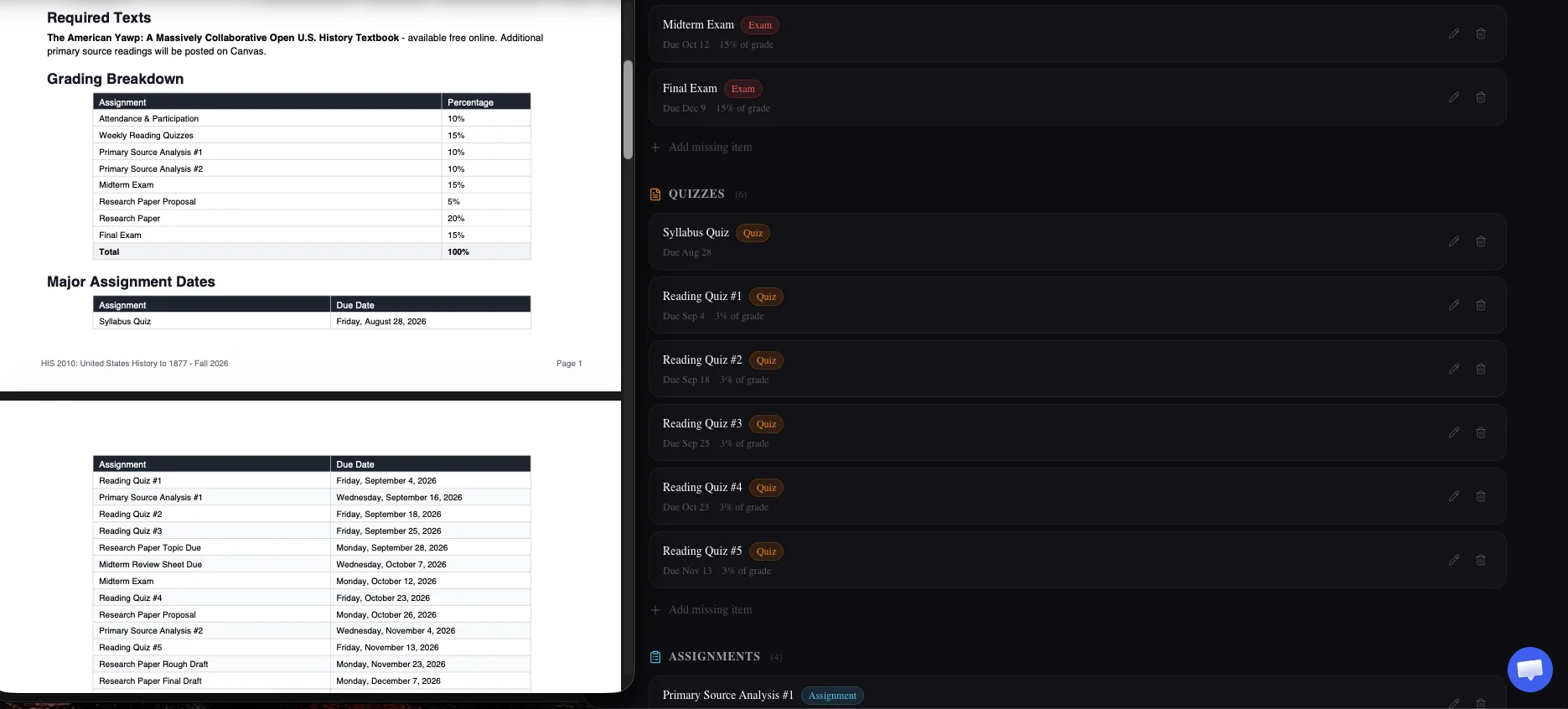
Check the extraction before confirming it. A syllabus can list a category weight for all quizzes together; that isn't necessarily the weight of each quiz. Missing dates and ambiguous entries need your attention too.
You can keep working in Notion. PassAI's Notion sync sends classes and assignment details, including due dates and weights, into PassAI's Semester Planner template. The sync runs from PassAI to Notion. Correct a synced date in PassAI; a change made only in Notion doesn't update PassAI.
PassAI starts with a 14-day Pro trial, no card required. Afterward, the free plan keeps 2 classes and their daily email. Grade tracking stays free; AI coaching requires trial or paid access. A student with 5 active classes needs paid access to keep all 5 available after the trial.
PassAI doesn't replace workspace-wide questions about your Notion notes or general page editing. For those jobs, keep Notion AI or use a study assistant separately. The Canvas-to-Notion setup guide explains the deadline workflow in more detail.
Before switching, check what your Notion student plan includes
You can keep Notion's Education Plan without treating its AI trial as an ongoing study subscription. Notion's education documentation describes a free plan for eligible college students with a one-member workspace. You need a qualifying school email and annual verification.
Notion's AI trial page describes limited trial usage on Free and Plus plans, followed by an upgrade requirement to continue. Check the offer shown in your own workspace, especially if you've had an older student arrangement. Don't assume that a free education workspace includes continuing AI use.
Notion can also do more than the old “blank template” comparison suggests. Its AI documentation says it can read uploaded files and build task databases. You can give it a syllabus and ask for a schedule. You don't have to type every date by hand.
The practical choice is how much setup and maintenance you want to own. If your existing Notion database works, keep it. If you're still deciding on a layout, the student Notion template comparison covers several approaches. Changing the cover image for the fourth time remains optional.
A setup for notes, studying, and deadlines
Keep one place for notes and one authoritative deadline list. Add a study assistant when you need help understanding the material. That gives each piece of information a home you can find again.
Consider this illustrative week: a history response is due Wednesday, a chemistry exam is Friday, and a lab report is due Sunday. The syllabus assigns 5% to the response, 25% to the exam, and 10% to the report. These are example figures, not results from a product test.
Use the planner to see the collision and the grade weights. Start chemistry review before Wednesday, and leave a separate work block for the lab report. Keep history reading notes in Notion. Use a source-based notebook to compare the assigned texts, or a tutoring chat to work through chemistry problems you can't solve.
If you want that arrangement with PassAI:
- Upload a syllabus and review the extracted dates and weights against the original.
- Get the free Semester Planner template and connect PassAI's Notion sync if you want the assignment rows beside your notes.
- Keep course notes and study-session details in Notion. Fix synced dates and weights in PassAI.
- When an instructor changes a deadline, check the update in your chosen deadline list before planning the week.
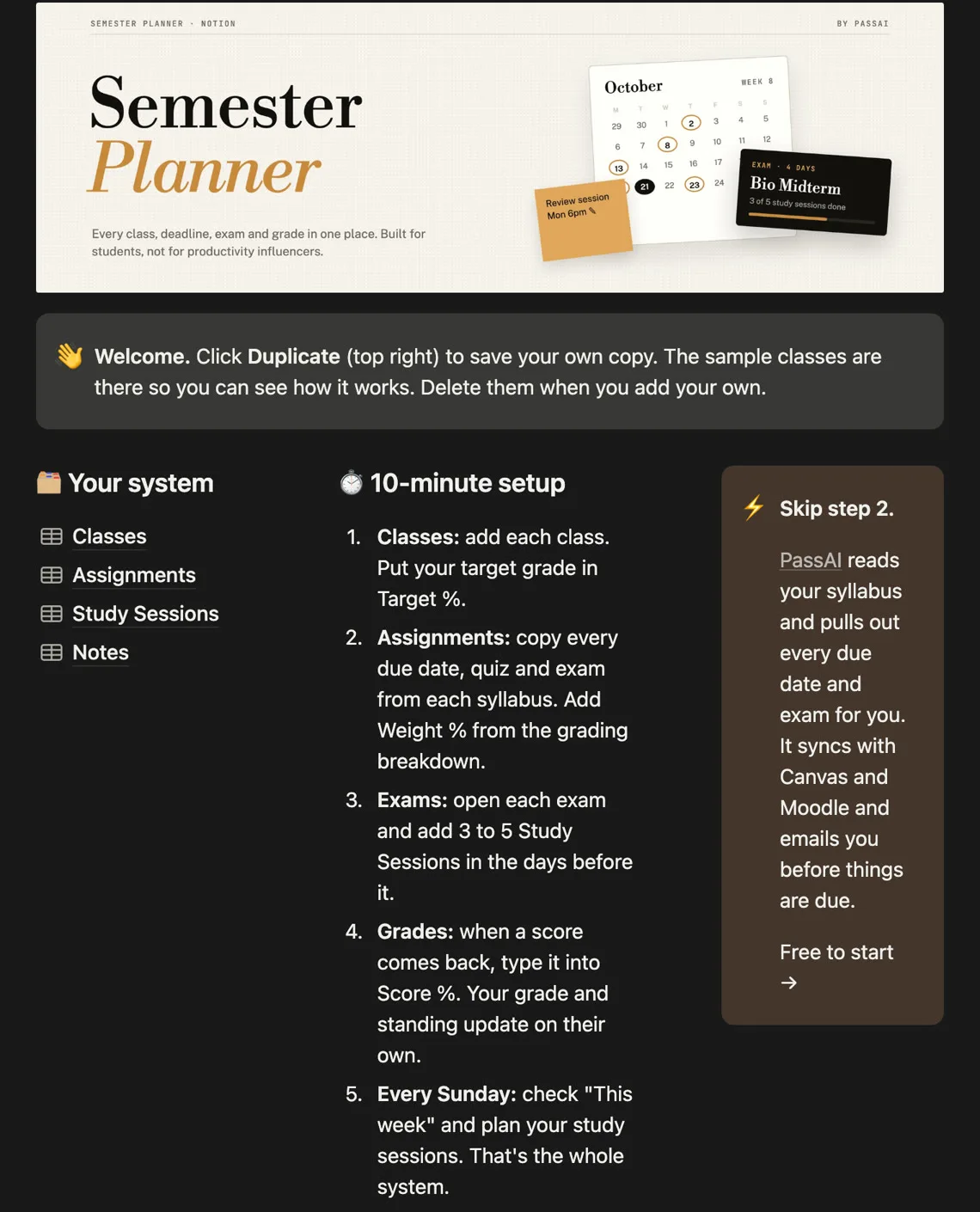
Use a separate assistant only for the study task in front of you. You don't need to move an entire semester's notes to test whether one tool explains an exam topic better.
When paying for Notion AI makes sense
Pay for Notion AI when its access to your existing pages and ability to work inside your workspace save you repeated copying. A separate chatbot is less convenient if every question depends on information spread across your Notion databases.
Try the alternatives first when you mainly need help with a reading or a difficult concept. Choose a syllabus planner when the recurring problem is keeping deadlines across classes visible. For PassAI, test a real syllabus during the trial and check the results before deciding whether the ongoing plan fits your class load.