The best Shovel alternative depends on why you're leaving. If it's the price or the daily time-blocking, PassAI reads your syllabus and plans your semester for you, with a free plan and a $24.99 Semester Pass. If you want $0 with Canvas sync, DormWay and Coursicle do that. Semora, MyStudyLife and Google Calendar cover narrower needs, and one thing Shovel still does better than everything here.
Shovel is a good product built around one idea: turn due dates into do dates. You upload a PDF syllabus or sync from Canvas, Brightspace, Moodle or Google Classroom, then schedule a block of time for each task. Its Cushion feature compares the hours your work needs against the hours you actually have and warns you before you fall behind. It holds 4.2 stars from 241 ratings on the App Store.
The 6 Shovel alternatives at a glance
| App | Reads your syllabus | LMS sync | Price | Upkeep | Best for |
|---|---|---|---|---|---|
| PassAI | Yes, with grade weights | No | 14-day trial, then 2 classes free · $24.99/semester or $49.99/yr | Low | Planning without time-blocking |
| DormWay | Yes | Canvas, Blackboard, Moodle | Free | Low | Free with LMS sync |
| Coursicle | Yes | Six LMS platforms | Free · optional Premium | Low | Students who already use it for registration |
| Semora | Yes (1 free scan) | Canvas, Blackboard, Moodle | Free for synced classes · $4.99/mo or $29.99/yr | Low | The cheapest paid plan, iPhone-first |
| MyStudyLife | No, you type it in | No | Free · MSL+ $6.99/mo or $39.99/yr | Medium | Rotating class schedules |
| Google Calendar | No | No | Free | High | Time-blocking for $0 |
For comparison, Shovel is $9.79 a month or $39 a year after a 7-day trial, per Shovel's pricing page. There is no free plan.
Why students leave Shovel
The first reason is that there is no free tier. After 7 days you pay or you lose the planner. $39 a year is fair for what Shovel does. But if all you wanted was your deadlines pulled out of a PDF, you're paying for a time-blocking system you don't use.
The second reason is the upkeep. Shovel's method works because you estimate each task and put it on the calendar. That is also its cost. A semester with 5 classes holds 60 to 80 graded items, and each one needs a time estimate and a block. When a week goes sideways, the blocks have to move. Students who keep that habit love Shovel. Students who stop doing it in week 4 end up paying for a calendar they've stopped opening.
There's a smaller third reason. Shovel's phone app is a companion to the website, and its App Store listing says you have to set up your account on the web first. The top review on that listing loves the idea and still calls the phone app "just kinda slow." If you live on your phone, try it during the trial before you pay.
1. PassAI: best if you want the planning without the time-blocking
PassAI is an AI study planner that reads your syllabus PDF and extracts every assignment, quiz and exam with its due date and grade weight, in under 60 seconds per course. On a real US history syllabus (HIS 2010), that came to 16 graded items: 2 exams, 6 quizzes and 8 assignments, each with its weight attached.
The difference from Shovel is who does the scheduling. Shovel asks you to block time for every task. PassAI decides what needs attention and tells you when:
- PassAI's Semester Map puts every class on one timeline and flags the crunch weeks, where three classes put something big due within days of each other. You see week 9 coming in week 2.
- PassAI gives every big item a start date. That means any exam, or anything worth 15% or more. Exams get 7 days, finals and projects get 10, and a crunch week adds 3 more. A 2% quiz gets nothing. It doesn't need a plan.
- PassAI's daily email covers what's due today and tomorrow, and warns you 7 days and 3 days before each exam. On Mondays it sends the week ahead.
- PassAI's grade tracking shows where you stand against your syllabus weights as scores come back.
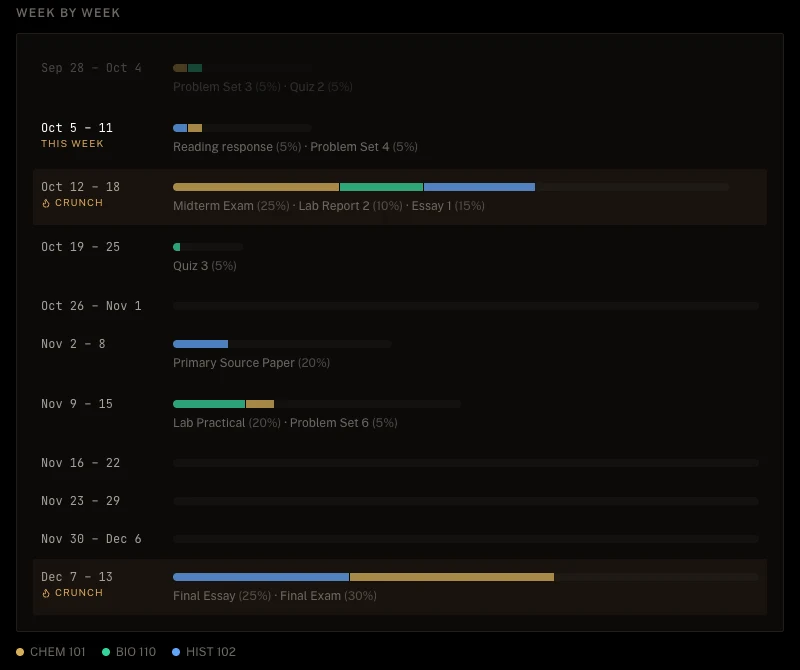
Every account starts with a 14-day Pro trial, no card, with every class unlocked. After that, the free plan keeps 2 classes with their daily email and grade tracking. Pro is $9.99 a month, $24.99 for a 4-month Semester Pass, or $49.99 a year.
Where PassAI is weaker than Shovel: there is no Canvas sync, no native phone app, and no hour-by-hour time-blocking. If you want to plan your Tuesday down to the 45-minute block, Shovel does that and PassAI doesn't. PassAI skips Canvas on purpose, because Canvas only shows what your professor has published so far. The longer version is in why Canvas isn't enough to track your assignments.
2. DormWay: best free Shovel alternative with LMS sync
DormWay is the closest free match for Shovel's import step. Its core features are free for students: unlimited syllabus uploads read by AI, read-only sync with Canvas, Blackboard and Moodle, an assignment tracker, and a GPA and grade calculator. It runs as a web app plus iPhone, iPad and Mac apps.
What you give up is Shovel's time budget. DormWay tracks what's due; it doesn't tell you whether your week has room for it. It has also said it plans a paid Pro tier without saying what it will cost. If you want your deadlines pulled in automatically for $0 today, start here.
3. Coursicle: best free pick if you already use it for registration
Coursicle is best known for class registration: the schedule builder, professor reviews and open-seat alerts. It has grown into a planner. Syllabus uploads, assignment sync from six LMS platforms (Canvas, Blackboard, Brightspace, Moodle, Sakai and Google Classroom), and reminders are all free.
That's a wider LMS list than Shovel's, at no cost. There is no time-blocking and no workload view, so it answers "what's due" and stops there. If you already open Coursicle every registration week, keeping your deadlines in the same app is the easy choice.
4. Semora: cheapest paid plan, built for the iPhone
Semora reads a syllabus from a photo, PDF or pasted text, pulls out assignments, exams and grade weights, and syncs classes from Canvas, Blackboard or Moodle. It runs on iPhone, iPad, Apple Watch and the web.
Its free plan syncs unlimited classes from your LMS but gives you one AI action, ever, which covers a single syllabus scan. Pro is $4.99 a month or $29.99 a year, per its App Store listing, and adds lecture recording, flashcards and a study plan. That's $9 a year less than Shovel. It's also a young app with few ratings so far, so expect rough edges.
5. MyStudyLife: best free planner for rotating schedules
MyStudyLife doesn't read your syllabus. You type in your classes, homework and exams yourself. In return the core planner is free across web, iPhone and Android, works offline, and handles rotating and A/B-day timetables better than anything else here. MSL+ is $6.99 a month or $39.99 a year.
The catch is the typing. MyStudyLife is only as good as the hour you spend filling it in, which is the same deal Shovel offers with its blocks. We compared it in detail in the best My Study Life alternatives.
6. Google Calendar: free time-blocking, if you'll do all of it yourself
If what you loved about Shovel was the blocks, Google Calendar does blocks for free. Create one calendar per class, add each deadline as an all-day event, then drag work sessions into your free hours.
What Google Calendar can't do is the part Shovel automates. It doesn't read your syllabus. It doesn't know a task's weight. It will never warn you that Thursday has 9 hours of work and 3 free hours. You become the Cushion. That's fine for a 3-class summer term and miserable for a 5-class fall.
What each option costs for a semester and a year
Here are the published prices side by side:
| One semester (~4 months) | One full year | |
|---|---|---|
| Shovel | ~$39 (monthly) or $39 (yearly) | $39 |
| PassAI | $0 (2 classes) or $24.99 (Semester Pass) | $0 or $49.99 |
| Semora | ~$20 (monthly) | $29.99 |
| MyStudyLife | $0, or ~$28 for MSL+ monthly | $0 or $39.99 |
| DormWay | $0 | $0 |
| Coursicle | $0 | $0 |
| Google Calendar | $0 | $0 |
Over a full year, Shovel's $39 isn't expensive. It sits mid-pack. So compare what the money buys. Shovel's buys the time budget. PassAI's buys the semester view: crunch weeks, start dates, grade weights. The free apps hand you the list and leave the planning to you.
When you should stay with Shovel
Some people should stay. If any of these is you, Shovel is worth the $39:
- You actually time-block. If you open Shovel daily and move your blocks when plans change, the method is working. Don't switch away from a habit that holds.
- You need the Cushion. Shovel tells you, in hours, whether your week fits. PassAI flags crunch weeks and DormWay lists deadlines, but neither does Shovel's hour-by-hour math against your free time.
- You rely on Brightspace or Google Classroom sync. Shovel supports both. PassAI has no LMS sync, and DormWay's list doesn't include either.
If your Shovel calendar has been empty since midterms, that's the answer too.
How to switch away from Shovel in about 10 minutes
Don't export your Shovel blocks. They were estimates for a week that's already gone. Go back to the source:
- Download each class's syllabus from Canvas or your email.
- Upload them to the new app, one per class. In PassAI each takes under a minute, and the upload guide shows what to check.
- Check the extracted list against the syllabus once, especially anything with an inferred date.
- Cancel Shovel before the next renewal, on shovelapp.io or in your App Store subscriptions.
If you're switching with exams coming up, the free exam study plan generator splits your study hours across them while you set up. And if you're not sure which deadline to protect first, use the method in how to prioritize assignments by grade weight.