The best assignment tracker app for college is one that fills itself in, because the tracker you have to type into is the one you stop opening by week 4. PassAI reads your syllabus and pulls in every assignment and exam with its grade weight. Coursicle and DormWay sync from Canvas for free. MyStudyLife, Power Planner and myHomework are the best manual trackers, and Shovel is the pick if you want to time-block every task.
A semester holds more deadlines than you think. One real US history syllabus we tested (HIS 2010) had 16 graded items: 2 exams, 6 quizzes and 8 assignments. Five classes like that is 80 deadlines in 15 weeks. You will track them somehow. The only question is which method lasts until finals.
The 7 best assignment tracker apps at a glance
| App | How it fills in | Shows grade weights | Price | Platforms | Best for |
|---|---|---|---|---|---|
| PassAI | Reads your syllabus | Yes | 14-day trial, then 2 classes free · $24.99/semester | Web | Knowing which deadline matters |
| Coursicle | Syncs from 6 LMS platforms | No | Free | iOS · Android · Web | Free Canvas sync |
| DormWay | Syncs Canvas, Blackboard, Moodle + reads syllabi | Yes | Free | Web · iPhone · iPad · Mac | Free sync plus syllabus reading |
| MyStudyLife | You type it in | No | Free · MSL+ $6.99/mo | Web · iOS · Android | Rotating class schedules |
| Power Planner | You type it in | Yes, with a GPA calculator | Free · $4.99 one-time | Windows · Mac · iOS · Android · Web | Tracking grades as well as deadlines |
| myHomework | You type it in | No | Free · $4.99/yr removes ads | iOS · Android · Web | The simplest possible list |
| Shovel | Syncs LMS or reads a PDF syllabus | No | $9.79/mo or $39/yr after a 7-day trial | Web · iOS · Android | Time-blocking every task |
How to choose an assignment tracker (the two questions that matter)
Ask two questions before you compare features. They predict whether you'll still be using the tracker in week 6.
1. How does it get filled in? There are three ways, and each has a failure mode:
- LMS sync (Coursicle, DormWay, Shovel) pulls assignments from Canvas automatically. It only sees what your professor has published, and plenty of professors publish a week or two at a time. The midterm in week 8 might not exist in Canvas until week 7.
- Syllabus reading (PassAI, DormWay, Shovel) pulls the whole semester from the PDF on day 1, including exams nobody has posted yet. It needs a quick check after upload, because a syllabus that says "TBA" gives the app nothing to read.
- Manual entry (MyStudyLife, Power Planner, myHomework) is as complete as you make it. Typing in 80 deadlines takes about an hour, and anything you add later depends on you remembering to.
2. Does it tell you which deadline matters? A tracker that lists a 2% reading quiz and a 25% paper the same way gives you a to-do list, not a priority. Grade weights are what turn "what's due" into "what to do first." The reasoning is laid out in how to prioritize assignments by grade weight.
1. PassAI: best for knowing which deadline matters
PassAI is an AI study planner that reads your syllabus PDF and extracts every assignment, quiz and exam with its due date and grade weight, in under 60 seconds per course. Because it reads the syllabus, the whole semester is there on day 1, including the final nobody has posted in Canvas yet.
PassAI's tracking goes past the list:
- PassAI's Semester Map shows every class on one week-by-week timeline and flags crunch weeks, where several big items land within days of each other.
- PassAI's start dates tell you when to begin anything big, meaning any exam or anything worth 15% or more. Exams start 7 days out, finals and projects 10, and a crunch week adds 3.
- PassAI's daily email lists what's due today and tomorrow, and warns you 7 and 3 days before each exam. You don't have to open the app for the tracker to work.
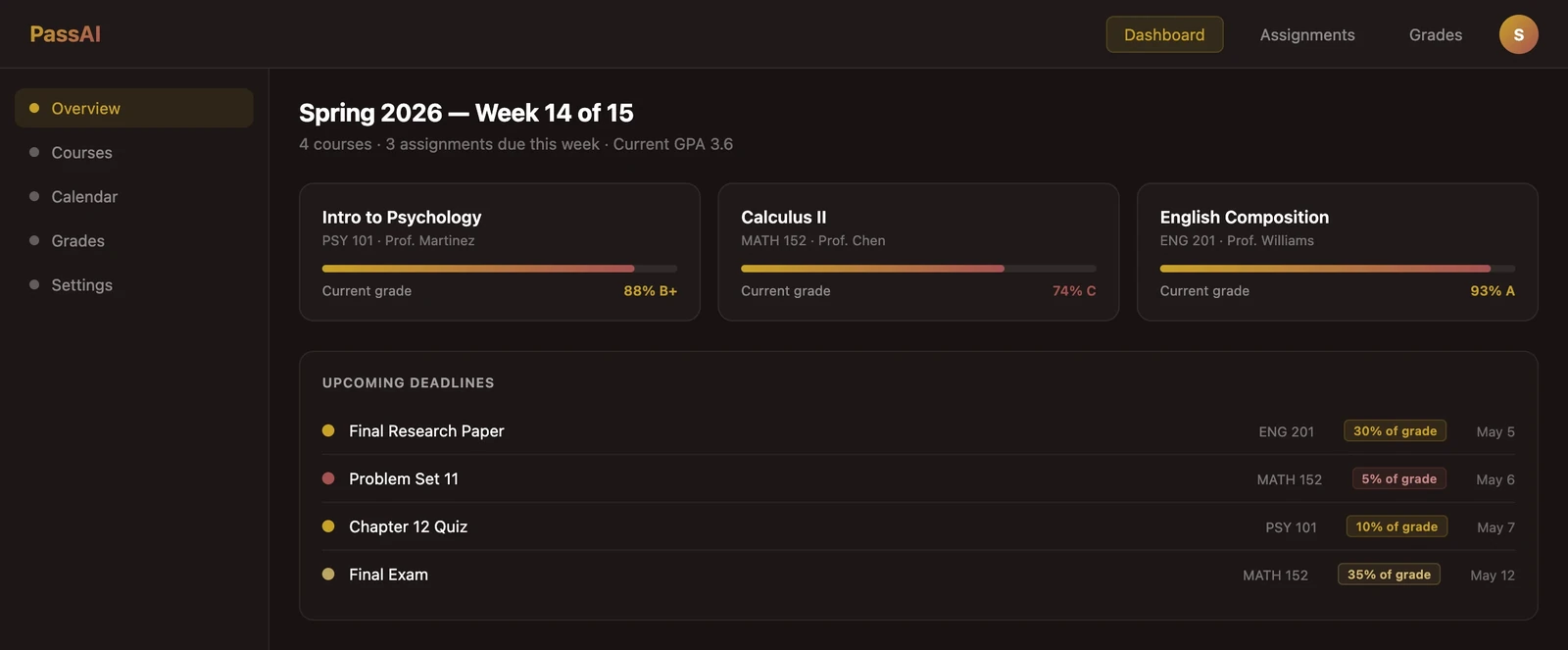
Every account starts with a 14-day Pro trial, no card. After that the free plan keeps 2 classes with daily emails and grade tracking. Pro is $9.99 a month, $24.99 for a 4-month Semester Pass, or $49.99 a year.
What PassAI doesn't do: there's no Canvas sync and no native phone app. If a professor adds a surprise assignment in Canvas mid-semester, you add it yourself.
2. Coursicle: best free assignment tracker with Canvas sync
Coursicle syncs and color-codes assignments from Canvas, Blackboard, Brightspace, Moodle, Sakai and Google Classroom, then reminds you before each one. That's the widest LMS list here, and the tracking is free. It holds 4.8 stars from 761 ratings on the App Store.
It started as a registration app (schedule builder, professor reviews, open-seat alerts), and that's still where most students meet it. As a tracker, it's as complete as your Canvas. If your professors post everything early, Coursicle is hard to beat for $0. It doesn't show grade weights, so the priority call is yours.
3. DormWay: best free tracker that also reads syllabi
DormWay does both fill-in methods for free. It syncs read-only from Canvas, Blackboard and Moodle, and it reads an uploaded syllabus with AI to catch exams and grading breakdowns that Canvas doesn't have yet. It runs on the web plus iPhone, iPad and Mac.
That combination covers the gap in a sync-only tracker. The catch is that DormWay has said it's building a paid Pro tier without saying what it will include or cost. The core is free today.
4. MyStudyLife: best free manual tracker for rotating schedules
MyStudyLife is a free planner you fill in yourself: classes, homework, exams and reminders across web, iPhone and Android. Where it beats everything else here is the class schedule. It handles rotating weeks and A/B days, which matters if your timetable isn't the same every week.
The trade-off is the typing. MyStudyLife is only as complete as the hour you spend on it in week 1. MSL+ is $6.99 a month or $39.99 a year. We compared it against six other apps in the best My Study Life alternatives.
5. Power Planner: best for tracking grades as well as deadlines
Power Planner is a manual tracker with the best grade features of the free apps. Enter each class's grading weights and your scores, and it calculates your current grade and GPA as the semester goes. It runs natively on Windows, Mac, iPhone, Android and the web, is ad-free, and a one-time $4.99 upgrade unlocks unlimited semesters.
It holds 4.8 stars from more than 1,700 App Store ratings. You type everything in. Once the weights are in, though, it's one of the few trackers here that knows a final outweighs a homework set.
6. myHomework: best for the simplest possible list
myHomework does one thing: a list of homework by class and due date, with reminders. It's free with ads on iPhone, Android and the web, and $4.99 a year removes the ads.
There's nothing to learn, which is the point. If you just want somewhere to write "problem set 4, Thursday" that buzzes you on Wednesday, this is it. Don't expect more. It reads nothing and syncs nothing.
7. Shovel: best if you want to time-block every task
Shovel imports your assignments from a PDF syllabus or from Canvas, Brightspace, Moodle or Google Classroom, then asks you to schedule a block of time for each one. Its Cushion feature compares the hours your tasks need with the hours you have free and warns you before you fall behind.
That makes Shovel more planner than tracker. It's also the only app here with no free plan: $9.79 a month or $39 a year after a 7-day trial, per Shovel's pricing page. It's worth it if you'll keep the blocks updated. If you won't, see the best Shovel alternatives.
Why most students abandon their assignment tracker
Students rarely quit a tracker because it's missing a feature. They quit because it stops being complete. And an incomplete list is worse than no list. You trust it, it's missing the quiz, and you find out on Thursday.
Three things break completeness:
- Week-1 setup never finishes. Manual entry for 5 classes is an hour. Most people do two classes and plan to finish later.
- Canvas lags the syllabus. A sync-only tracker inherits every gap in what your professors have published.
- Nothing pulls you back in. An app you have to remember to open is a reminder app that needs reminding. Push notifications and a daily email do the remembering for you.
Pick the tracker that fixes the one most likely to hit you. If you never finish setup, choose something that reads the syllabus. If your professors post late, don't rely on sync alone. If you forget to check, choose one that emails or notifies daily. The full system around the app is in how to stay on top of assignments in college.
How to set up any assignment tracker in 20 minutes
Whichever app you choose, set it up the same way:
- Collect every syllabus from Canvas or your email, not just the course pages.
- Get every graded item in at once, by upload, sync or typing, before you trust the list. Half a tracker teaches you to ignore it.
- Check it against the syllabus once. Look for exams marked "TBA" and anything the app guessed.
- Mark the heavy items. Anything worth 15% or more, or any exam, gets a start date, not just a due date.
- Turn on reminders and decide when you'll look each day. Ten minutes over breakfast is enough.
If the setup step is what keeps stopping you, the syllabus upload guide shows what reading a PDF looks like in practice.