The best UpAhead alternative depends on why you're leaving. If it's the price, PassAI reads your syllabus and plans your semester for $24.99 a semester or $49.99 a year, against UpAhead's $119. If you want it free, DormWay and Coursicle both read syllabi and sync with Canvas at no cost. Shovel, Semora and Power Planner cover more specific needs, and there are three things UpAhead still does better than all of them.
UpAhead is a real product, not a bad one. It turns a syllabus into a schedule in about 30 seconds, syncs with Canvas, Moodle, Blackboard and D2L, sends reminders by text, and now runs in a browser as well as on iPhone. It holds 4.1 stars from 63 ratings on the App Store. Students leave for two reasons, and both are about money.
The 6 UpAhead alternatives at a glance
| App | Reads your syllabus | LMS sync | Price | Platforms | Best for |
|---|---|---|---|---|---|
| PassAI | Yes, with grade weights | No | 14-day Pro trial, then 2 classes free · $24.99/semester or $49.99/yr | Web | The most planning per dollar |
| DormWay | Yes | Canvas, Blackboard, Moodle | Free | Web · iPhone · iPad · Mac | Free with LMS sync |
| Coursicle | Yes | Six LMS platforms | Free · optional Premium | Web · iOS · Android | Students who already use it for registration |
| Shovel | Yes | Canvas, Brightspace, Moodle, Google Classroom | $9.79/mo or $39/yr after a 7-day trial | Web · iOS · Android | Checking whether your week actually fits |
| Semora | Yes (1 free scan) | Canvas, Blackboard, Moodle | Free for synced classes · $4.99/mo or $29.99/yr | iPhone · iPad · Watch · Web | The cheapest paid plan, iPhone-first |
| Power Planner | No, you type it in | No | Free · $4.99 one-time upgrade | Windows · Mac · iOS · Android · Web | A free manual planner with a GPA calculator |
For comparison, UpAhead is $19 a month or $119 a year after its one-class free plan.
Why students leave UpAhead
The first reason is price. UpAhead's App Store listing sells Premium at $6.99 a week, $19 a month, $119 a year, or $199.99 for lifetime access. A single semester on the monthly plan is about $76. That's more than any paid option in this list charges for a full year.
The second is the free plan. It covers one class, and you find that out after setup. That's the theme of UpAhead's recent one-star App Store reviews: one student connected Canvas and found only one class on the schedule. Others describe the opposite failure, a syllabus upload where "half of my assignments weren't added." Extraction mistakes happen in every syllabus app, which is why you should check the first upload against the PDF whichever one you pick.
If neither of those bothers you, stay. The section near the end covers who should.
1. PassAI: best value if you want the syllabus read and the semester planned
PassAI is an AI study planner that reads your syllabus PDF and extracts every assignment, quiz and exam with its due date and grade weight, in under 60 seconds per course. On a real US history syllabus (HIS 2010), that came to 16 graded items: 2 exams, 6 quizzes and 8 assignments, each with its weight attached.
Extraction is the easy part. Most of these apps do it. What PassAI does with the list is the point:
- PassAI's Semester Map puts every class on one timeline and flags the crunch weeks, the ones where three classes put something big due within days of each other. It also gives each exam and paper a start date, so you start them before that week arrives, not during it.
- PassAI's daily email covers what's due today and tomorrow, and warns you 7 days and 3 days before each exam instead of the night before. On Mondays it sends the week ahead.
- PassAI's AI study plans turn one exam into day-by-day tasks sized to the time you have left.
- PassAI's grade tracking shows where you stand against your syllabus weights as scores come back, and what you need on what's left.
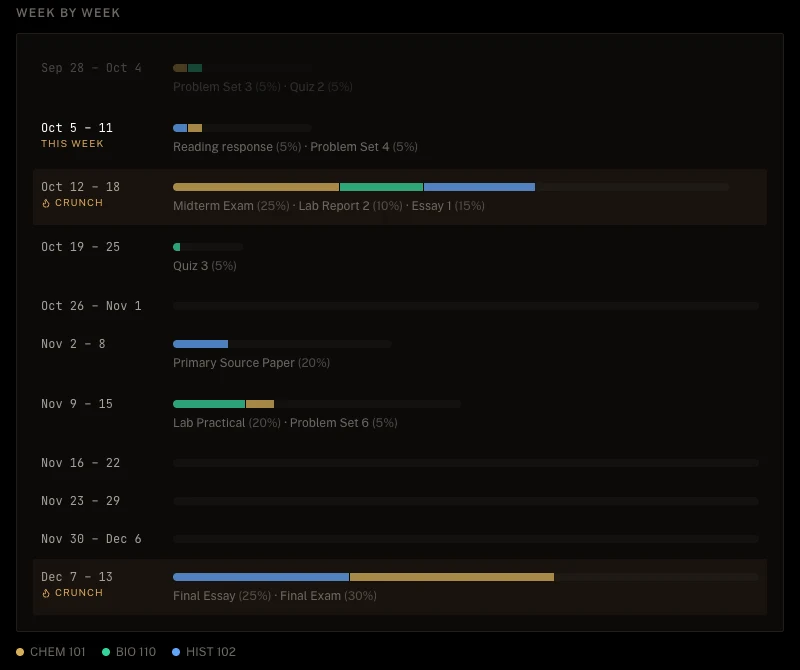
The price is the main difference from UpAhead. Every account starts with a 14-day Pro trial, no card, with every class unlocked. After that, Pro is $9.99 a month, $24.99 for a 4-month Semester Pass, or $49.99 a year, which covers all three semesters including summer. The free plan keeps 2 classes with their daily email and grade tracking.
Where PassAI is weaker: there is no Canvas sync, no native phone app, and no text-message reminders. It reads the syllabus instead of Canvas on purpose, because Canvas only shows what your professor published. Our side-by-side PassAI vs UpAhead comparison goes through every feature.
2. DormWay: best free option with LMS sync
DormWay is the closest free match for what UpAhead does. Its core features are free for students: unlimited syllabus uploads read by AI, read-only sync with Canvas, Blackboard and Moodle, an assignment tracker, and a GPA and grade calculator. It runs as a web app plus iPhone, iPad and Mac apps.
The catch: DormWay is still building a paid Pro tier and hasn't said what it costs or what goes into it. It promises the core stays free. If you want UpAhead's main workflow for $0 today, start here.
3. Coursicle: best free pick if you already use it for registration
Coursicle is best known for class registration: the schedule builder, professor reviews and open-seat alerts. It has grown into a planner too. Syllabus uploads, assignment sync from six LMS platforms (Canvas, Blackboard, Brightspace, Moodle, Sakai and Google Classroom), and push and email reminders are all free, and you don't need an account.
Premium adds things like unlimited open-seat alerts, home-screen widgets, and more Monday week-ahead emails (the free plan includes 3). If you already open Coursicle every registration week, keeping your deadlines in the same app is the easy choice.
4. Shovel: best for checking whether your week actually fits
Shovel builds a study schedule from your coursework, which it reads from a PDF syllabus or syncs from Canvas, Brightspace, Moodle or Google Classroom. Its signature feature, the Cushion, estimates how long each task takes, subtracts that from your real free hours, and tells you whether you're ahead or behind.
That answers a different question than UpAhead does. UpAhead tells you what's due. Shovel tells you whether you have the hours to do it. It costs $9.79 a month or $39 a year after a 7-day free trial, per Shovel's pricing page. That's a third of UpAhead's annual price, with no free tier.
5. Semora: cheapest paid plan, built for the iPhone
Semora is the closest thing to a cheaper UpAhead. It reads a syllabus from a photo, PDF or pasted text, pulls out assignments, exams and grade weights, and syncs classes from Canvas, Blackboard or Moodle. It runs on iPhone, iPad, Apple Watch and the web.
The free plan is generous with sync and stingy with AI. It syncs unlimited classes from your LMS, but you get one AI action, ever, which covers a single syllabus scan. Pro is $4.99 a month or $29.99 a year, per its App Store listing, and adds lecture recording, flashcards, practice quizzes and a study plan. That's a quarter of UpAhead's annual price. It's also a young app, with 10 App Store ratings so far.
6. Power Planner: best free manual planner on every platform
Power Planner doesn't read your syllabus. You type in your classes and assignments yourself. In return it is free, ad-free, and runs natively on Windows, Mac, iPhone, Android and the web. A one-time $4.99 upgrade, not a subscription, unlocks unlimited semesters and more than five grades per class.
Its weighted GPA calculator is the strongest in this list, and it holds 4.8 stars from over 1,700 App Store ratings. Pick it if you'd rather enter 80 deadlines by hand than pay anything. Most students find that number is the reason they wanted a syllabus scanner in the first place.
What each option costs for a semester and a year
Price is why most people search for an UpAhead alternative. Here it is side by side, from each app's published prices:
| One semester (~4 months) | One full year | |
|---|---|---|
| UpAhead | ~$76 (monthly) | $119 |
| PassAI | $24.99 (Semester Pass) | $49.99 |
| Shovel | ~$39 (monthly) | $39 |
| Semora | ~$20 (monthly) | $29.99 |
| Power Planner | $0, or $4.99 once | $0, or $4.99 once |
| DormWay | $0 | $0 |
| Coursicle | $0 | $0 |
The free options do less of the planning. They give you the list. PassAI's crunch weeks, start dates and AI study plans are what the $24.99 pays for, and the trial is the cheap way to find out if you'd use them: 14 days, your own classes, no card.
When you should stay with UpAhead
Some people should stay. UpAhead keeps three real advantages:
- Text-message reminders. UpAhead sends deadline alerts by SMS as well as push and email. If texts are how you actually notice things, that's a real reason to stay. PassAI, for one, only emails.
- Sharing with parents or a chapter. UpAhead lets a student invite a parent to see grades or assignments, with the student choosing what's shared. It also has a Greek Life version that gives a fraternity or sorority exec board a live view of the chapter's GPA.
- A native iPhone app with a working LMS sync. If your school's Canvas is complete and you live on your iPhone, UpAhead's combination is hard to beat. DormWay and Coursicle are the free alternatives that come closest.
If one of those is why you're on UpAhead, the $119 buys something the others don't sell.
How to switch in about 10 minutes
Don't try to export your UpAhead data. Go back to the source instead. Your syllabus PDFs hold every deadline and grade weight, including the ones UpAhead may have missed.
- Download each class's syllabus from Canvas or your email.
- Upload them to the new app, one per class. In PassAI each takes under a minute.
- Check the extracted list against the syllabus once, especially anything marked as an inferred date.
- Turn on reminders, then cancel UpAhead Premium in your App Store subscriptions before it renews.
If you're switching mid-semester with exams coming up, our free exam study plan generator splits your study hours across them while you set up. And if you're unsure which deadline to protect first, the method is in how to prioritize assignments by grade weight.