The best AI study planner for college students is the one whose AI reads your actual deadlines, because a plan built on guessed dates breaks the first time a real date doesn't match. Our top pick is PassAI: its AI reads your syllabus, pulls every assignment, quiz and exam with its grade weight, and builds a day-by-day plan around them. If you want an AI that time-blocks your whole calendar, Reclaim.ai is the best value, and Shovel is the pick if your school runs everything through Canvas.
We make PassAI, so weigh our pick against the facts. Every app below gets a "won't do" line, PassAI included, and every competitor price was checked on the vendor's own pricing page on November 18, 2026.
The short answer
- PassAI: best overall, because the AI starts from your syllabus and weights the plan by what each deadline is worth.
- Shovel: best if your classes live in Canvas, Brightspace, Moodle or Google Classroom.
- MyStudyLife: best for building a class timetable from a photo.
- Reclaim.ai: best free AI scheduler for your calendar (and 50% off for students).
- Motion: best for a heavy, work-style task load, if you'll pay work-software prices.
- Notion AI: best if you already run your life in Notion.
- Gemini Notebook (formerly NotebookLM): best free AI for studying your own notes. It's a study tool, not a planner.
- ChatGPT: best for a one-off plan when you paste in every date yourself.
What the AI actually does in each app
"AI study planner" covers very different tools: every AI study planner app here uses AI, but on different inputs. Some read your coursework, some move blocks around your calendar, and some turn notes into quizzes. The table sorts them by what the AI is given and what it hands back.
| App | What the AI reads | What it builds | Free option | Paid price (checked Nov 18, 2026) |
|---|---|---|---|---|
| PassAI | Your syllabus (PDF, Word, photos, text) or a Canvas/Moodle feed | Every deadline with its grade weight, a day-by-day study plan, study guides | 14-day Pro trial, then 2 classes free | $9.99/mo or $24.99 per semester |
| Shovel | PDF syllabus or Canvas, Brightspace, Moodle, Google Classroom | Daily study sessions toward each due date | 7-day trial | $7/mo, or $36/yr |
| MyStudyLife | A photo or description of your timetable | Class timetable, week plans, revision plans | Free planner + 1 AI scan | $6.99/mo or $39.99/yr |
| Reclaim.ai | Your calendar, tasks and habits | Focus time and habits blocked into open slots | Lite, free (1-week range) | $10/seat/mo billed yearly, 50% off for students |
| Motion | Your tasks, projects and calendar | An auto-planned calendar | Free trial | $19/mo yearly, $29 monthly |
| Notion AI | Your Notion pages | Summaries, drafts, answers about your notes | Free and Education plans; full AI is paid | Business $20/seat/mo |
| Gemini Notebook | Notes, PDFs and sources you upload | Answers, summaries, Audio Overviews | Free with a Google account | Not needed |
| ChatGPT | Whatever you paste into the chat | A study plan in text | Free plan | Optional |
Only the first two read the coursework itself. Everything else either plans around a calendar you fill in or works on material you've already collected.
The 8 best AI study planners, compared
1. PassAI: best overall, because the AI starts from your syllabus
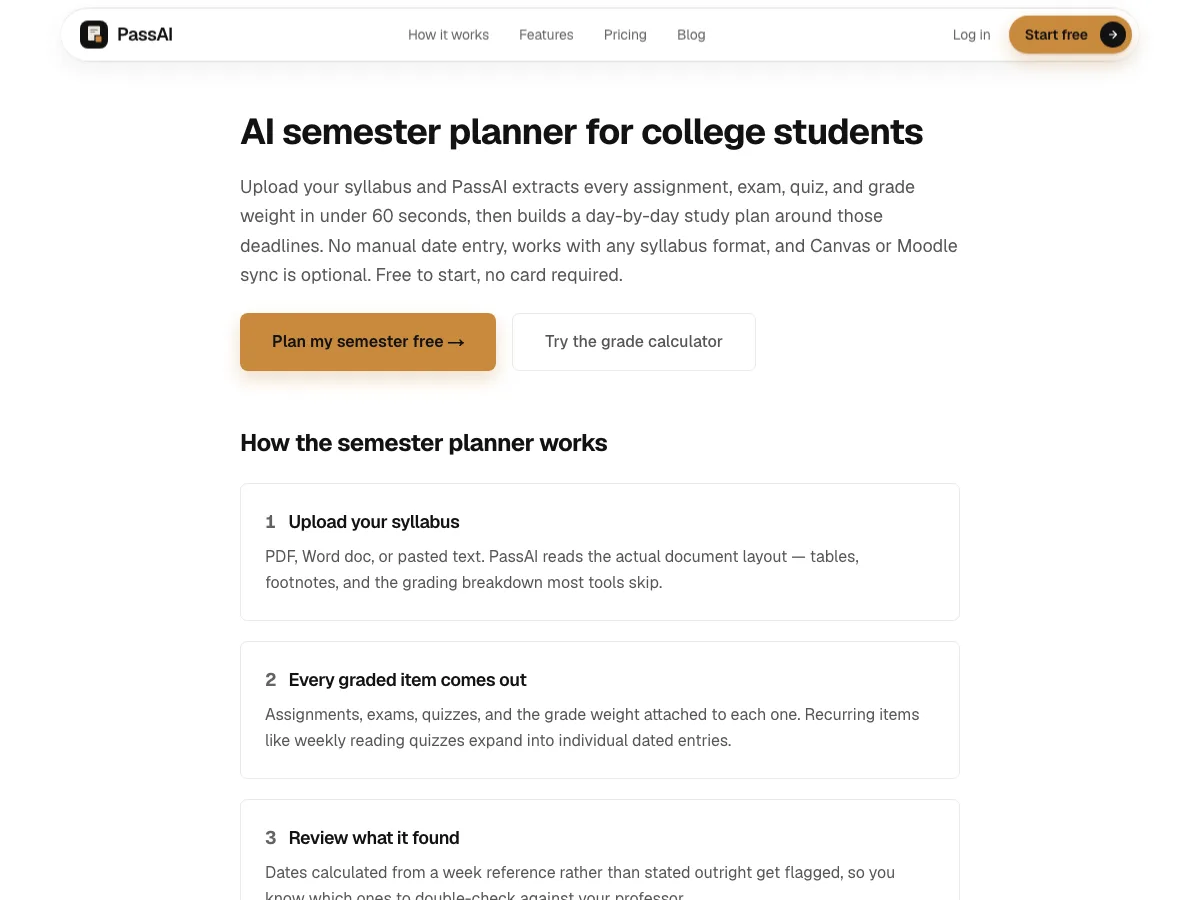
PassAI is built for one job: turning the syllabus your professor already gave you into a plan you can follow. Upload it as a PDF, a Word file, up to 8 photos of a paper copy, or pasted text, and the AI does the setup every other app on this list leaves to you:
- It reads the grading table, too. Each assignment, quiz and exam comes out with its date and grade weight. Weekly reading quizzes become individual dated entries. The weight matters because a 25% final deserves a two-week runway and a 2% quiz doesn't.
- It flags what it wasn't sure of. Dates written as "week 10" instead of a calendar date get flagged on a review screen, so you check them before anything is saved.
- It plans by the day. For an exam or a big assignment, PassAI's study plan gives each day before the deadline a dated task with an estimated number of minutes.
- It shows the crunch weeks early. The Semester Map lines up every class on one timeline and flags the weeks where several deadlines land at once.
- It writes study guides. On Pro, the AI writes a study guide for your next exams from the topics in your syllabus, plus practice quizzes and step-by-step breakdowns of big assignments (40 a month on Pro).
- It comes to you. A morning email lists today's work for each class, a calendar link puts everything in Google, Apple or Outlook Calendar, and a Canvas or Moodle feed is re-checked daily so a moved date shows up on its own.
On a real history syllabus, that came to 16 graded items (2 exams, 6 quizzes and 8 assignments) with every weight filled in. Doing that by hand for five classes is most of an afternoon. See it on the AI semester planner page, or try the free exam study plan generator without an account.
Won't do: run as a native phone app (it's a web app that works in your phone's browser), or write your assignments. It plans the work and the writing is yours. After the 14-day trial (no card), the free plan keeps 2 classes; Pro is $9.99 a month or $24.99 for a 4-month Semester Pass.
2. Shovel: best for Canvas and other LMS schools
Shovel gets your coursework from a PDF syllabus or by syncing with Canvas, Brightspace, Moodle or Google Classroom, then turns each due date into study sessions on the days before it. Its Cushion feature compares the study hours you have with the work that's due and flags weeks that won't fit.
Won't do: run for free. After a 7-day trial it's $7 a month or $36 a year billed yearly. Our Shovel alternatives post covers cheaper routes.
3. MyStudyLife: best AI for building your class timetable
MyStudyLife's AI coach, Scout, builds your timetable from a photo, a screenshot or a plain-English description, rotations included. On MSL+ it can also plan your week and build revision plans around the exams you've entered. The core planner (timetable, calendar, exams with countdowns) is free on web, iPhone and Android.
Won't do: give you more than one AI scan for free, or hold more than 5 tasks at a time on the free plan. Unlimited Scout AI is part of MSL+ at $6.99 a month or $39.99 a year. The My Study Life alternatives post compares the options.
4. Reclaim.ai: best free AI scheduler
Reclaim.ai fills the open space in your Google or Outlook calendar with focus time and habits, and moves them when something else gets booked. For a student, that means a "study 2 hours a day" habit that defends itself around classes and shifts. The Lite plan is free forever, and students, educators and faculty get 50% off paid plans for 12 months.
Won't do: look more than a week ahead on the free plan (Lite's scheduling range is 1 week; Starter is 8 weeks at $10 per seat a month billed yearly), or know what's due. You still type every task and deadline in.
5. Motion: best for a work-style task load
Motion's AI takes your tasks, projects and deadlines and lays them out across your calendar, rebuilding the schedule as things change. It's strong if you juggle school, a job and side projects in one task list, and it runs on iPhone, Android and desktop.
Won't do: come cheap. Pro AI is $19 per seat a month billed yearly or $29 monthly, after a free trial, and it's built for professionals and teams, not as an AI study planner for students. It doesn't read a syllabus, so the setup is all yours.
6. Notion AI: best if your notes already live in Notion
Notion's free Education plan is a great home for notes, a class database and a task list, and you keep it as long as you re-verify your school email once a year. Notion AI can summarize your pages, draft from them and answer questions about them.
Won't do: give full AI for free. On the Free and Plus plans Notion AI is a limited trial, and full credits come with the Business plan at $20 per seat a month. It also won't build a schedule from your syllabus. Our Notion AI alternatives for students post goes deeper.
7. Gemini Notebook (formerly NotebookLM): best free AI for studying your notes
Google renamed NotebookLM to Gemini Notebook. You upload lecture notes, PDFs and readings, and it answers questions grounded in those sources, writes summaries and makes Audio Overviews you can listen to. It's free with a Google account, and it's the best free study tool on this list.
Won't do: plan anything. It doesn't know your deadlines, so it can't tell you what to study on Tuesday. Pair it with a planner.
8. ChatGPT: best for a one-off plan you feed it yourself
ChatGPT will turn "I have 3 exams in 2 weeks" into a tidy day-by-day plan in seconds, and it's free to try. The plan is only as good as what you paste in: give it your exam dates and grading table and it does a decent job.
Won't do: know your real dates. Describe your classes without pasting the syllabus and it fills the gaps with plausible-looking dates. It also won't remind you, sync to a calendar or notice when your professor moves an exam.
Planner vs study tool: why most students need one of each
Google's own AI answer for this search splits the picks into planners and study-content tools, and that split is the most useful thing to know before you pick. A planner decides when you study: PassAI, Shovel, MyStudyLife, Reclaim.ai, Motion. A study tool helps with what you study once you sit down: Gemini Notebook, StudyFetch, Mindgrasp, Quizlet.
No single app is best at both. A good pair is a planner that knows your deadlines plus a free study tool for the material. For example, PassAI for the semester plan and Gemini Notebook for your lecture notes. PassAI's study guides cover your exams, but a notes tool is still handy for readings you upload yourself. For a wider list sorted by task, see our best AI tools for college students.
What to avoid when you pick an AI study planner
Paying professional prices for a student problem. Motion's $19 to $29 a month and Notion's $20 Business plan are priced for companies.
Plans built on guessed dates. An AI that never saw your syllabus can only guess when the midterm is. That's fine for a template, and a problem for a plan you'll actually follow. Check where the dates come from before you trust the schedule.
Plans that ignore grade weights. Two deadlines on the same day aren't equal if one is worth 30% and the other 2%. Most schedulers treat every task as the same size unless you tell them otherwise. PassAI reads the weights from the grading table, so the plan already knows.
An app you have to remember to open. Look for a plan that reaches you, by email, push notification or your calendar, because the app you forget to check is the first one to slip.
How to pick in 2 minutes
The best AI for study schedule building depends on where your dates live: in a syllabus, in an LMS, or only in your head.
- You have syllabi and want a plan by tonight: use PassAI. Upload one syllabus, check the review screen, and the study plan, Semester Map and morning email are set up. Start on the syllabus to study schedule page.
- Your school keeps everything in Canvas or another LMS and you'll pay $36 a year: use Shovel.
- You mostly need your class timetable built: use MyStudyLife's free scan.
- Your calendar is the problem, not your syllabus: use Reclaim.ai's free Lite plan with the student discount if you upgrade.
- You need help learning the material: add Gemini Notebook, free, on top of whichever planner you picked.
If you're still deciding between general planners rather than AI ones, our best planner app for college students comparison covers Power Planner, myHomework, Todoist and Google Calendar.