PassAI and UpAhead AI both promise the same thing: upload your syllabus, get a schedule. The difference is what shows up after upload — and where you can open it. PassAI extracts grade weights alongside due dates and runs in any web browser. UpAhead AI focuses on setup speed with a running grade per class, and it is iOS-only.
Here is what each one actually does, what it costs, and which one fits your situation.
PassAI vs UpAhead AI at a glance
| PassAI | UpAhead AI | |
|---|---|---|
| Platform | Web (any browser, any OS) | iOS only |
| Free tier | 5 syllabus uploads, no card | 1 class |
| Paid | Pro $9.99/mo · Scholar $14.99/mo | $9.99/mo |
| Setup time | Under 60 seconds per syllabus | ~30 seconds |
| Grade weights | Extracted on upload | Running grade per class |
| Study plan built | Day-by-day, from weights + deadlines | Assignment list + reminders |
| LMS sync | None (reads syllabus directly) | Canvas read-only calendar feed |
| Reminders | Daily email | Push · email · text |
| Best for | Anyone not on iOS · students who need to see weights | iPhone-only students who want SMS and the fastest possible setup |
Two of those rows decide it for most people: platform and grade weights.
Platform is the first filter
PassAI runs on the web, so it opens on a Chromebook, a Windows laptop, an iPad in Safari, an Android phone, or an iPhone. Nothing to install. UpAhead AI is an iOS app per its App Store listing, which means no Android, no web version, no Windows.
That gap is the whole conversation for a lot of students. If your laptop is not a Mac and your phone is not an iPhone, UpAhead is not a real option — you would be doing your planning on a device the app does not run on. Cross-platform matters here because you actually plan your week on the laptop and check off tasks on your phone, and the two need to be the same tool.
If you are all-Apple, this row is a wash and the other differences take over.
Grade weights are the second filter
PassAI reads the grading breakdown table on your syllabus and stores each item's weight next to its due date. UpAhead AI shows a running grade in each class as assignments come in, which means it tracks weight somewhere, but the App Store description does not commit to pulling weights directly off the syllabus on upload.
The distinction matters because weights change how you plan a week. A 2% discussion post and a 30% midterm show up identically on a calendar. When four things are due in the same week — which happens every semester — the weight is the only number that tells you which one to protect. Knowing that in week two is different from finding it out after the first assignment posts a grade.
PassAI has this on upload. UpAhead surfaces it as the semester runs. If you plan around weights, PassAI is the safer read of a syllabus.
Free tiers: five syllabi vs. one class
PassAI's free tier gives you five syllabus uploads and full grade tracking with no credit card. That is enough to plan a normal five-course semester without paying.
UpAhead AI's free tier covers one class. A full semester needs the paid plan at $9.99 per month per the App Store listing. That is the same paid price as PassAI Pro, so at the paid tier they cost identically — but at the free tier there is a five-to-one gap in what you can actually try.
The practical outcome: you can plan a real semester on PassAI free and see whether it works before you pay. On UpAhead you get one class free and then a decision.
Setup speed: both are fast, but they output different things
UpAhead advertises a populated schedule in 30 seconds. PassAI takes under 60 seconds per syllabus. Both are fast enough that setup speed is not the deciding factor — the failure mode this category worries about is students abandoning the tool at course three, and either of these apps clears that bar.
What they hand you at the end is not the same, though. UpAhead gives you a list of assignments with dates. PassAI gives you the same list plus the grading table extracted, recurring items like "weekly reading quiz" expanded into twelve individual dated entries, and inferred dates flagged so you know which handful to confirm with your professor rather than trusting all sixteen equally.
On a real history syllabus PassAI found 16 graded items: 2 exams (a midterm and final worth 15% each), 6 quizzes, and 8 assignments including a research paper split into rough draft and final. Every weight came off the grading table. That is what the extra 30 seconds buys.
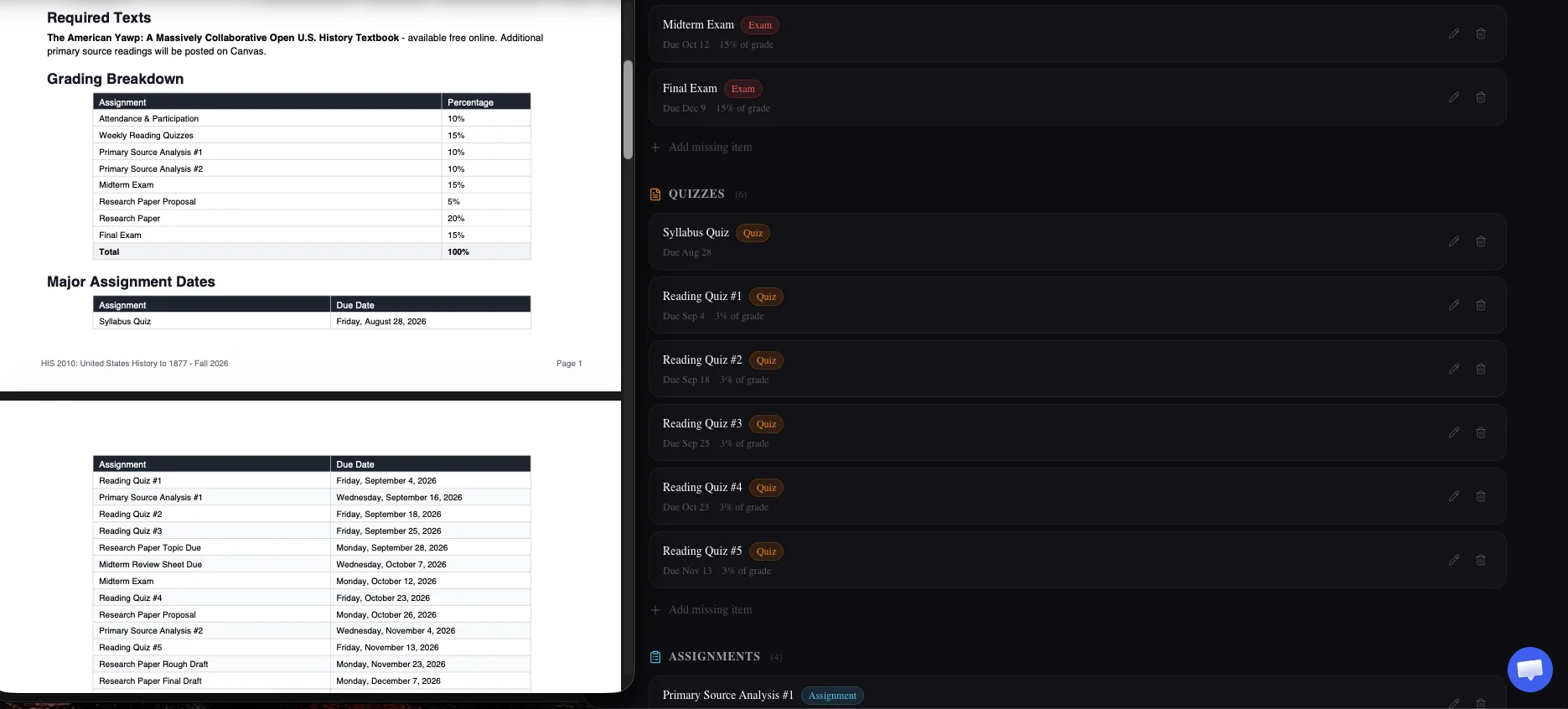
Grade tracking: before vs. after
PassAI knows the weights the moment you upload, so it can prioritize your week from day one. UpAhead AI surfaces a running grade class-by-class as assignments come in and get graded.
Both are useful; they are answers to different questions. "What should I focus on Tuesday?" is a weight question — PassAI answers that better because it has the weights before you have any grades. "Where do I actually stand in this class right now?" is a running-grade question, and UpAhead answers that natively. PassAI also has a running grade in its dashboard, but its opinion of your week is driven by the weights it pulled on day one.
If you are already dialed in and just want to know your current standing, both work. If you are trying to figure out where to spend Tuesday night the first week of the semester, weights on upload beats grades on delivery.
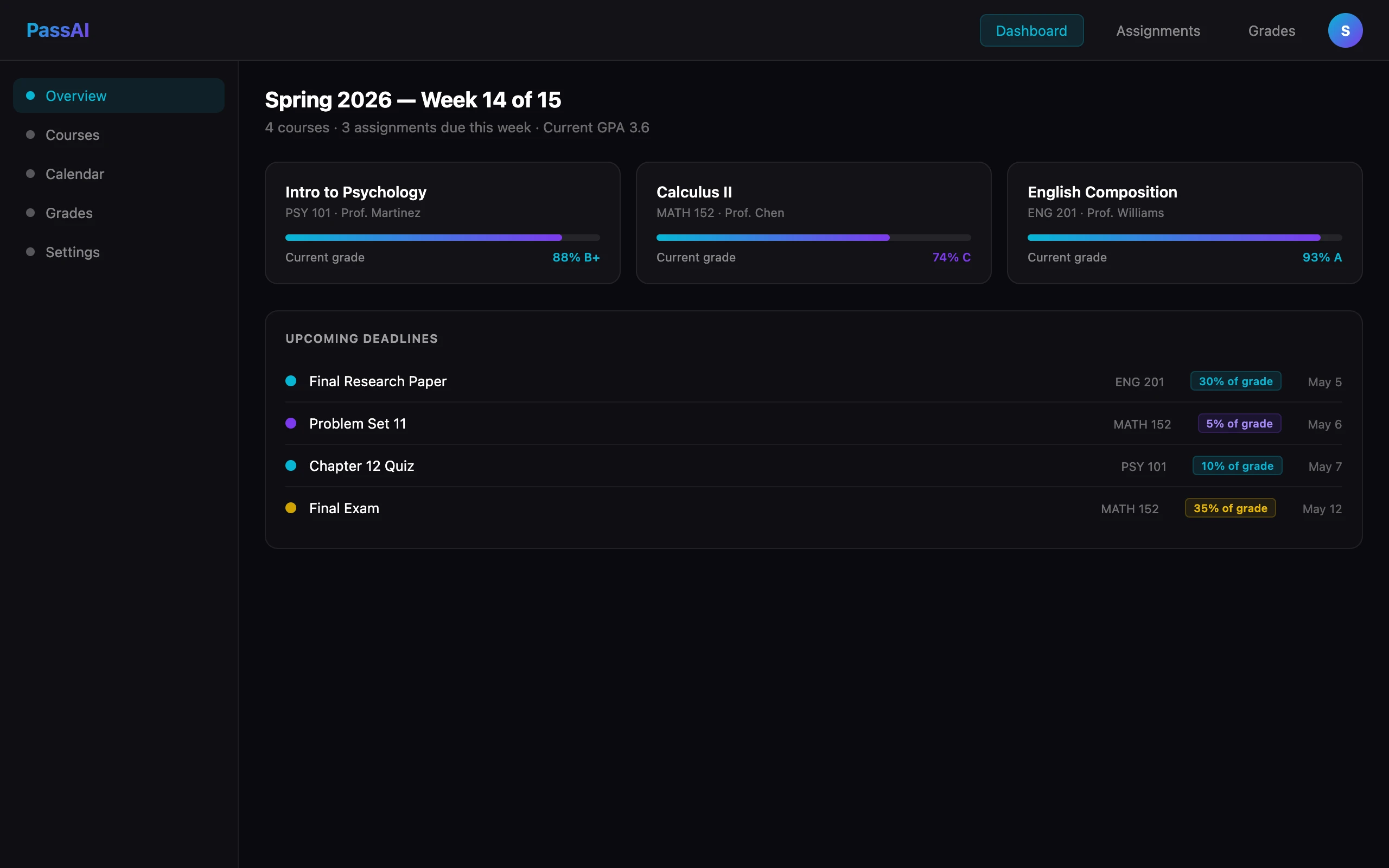
LMS integration: neither one replaces Canvas
UpAhead AI connects to Canvas through a read-only calendar feed rather than a full integration. That means it can pull dates your professor entered but does not sync back or negotiate the finer parts of the LMS.
PassAI does not connect to Canvas at all. That is deliberate: we wrote about why Canvas isn't enough as a source of truth — the LMS is only as complete as your professor keeps it, which is frequently partial and often late. PassAI reads the syllabus directly, which is the authoritative source for what a course actually contains.
If real LMS sync is what you need — you attend a school where professors genuinely keep Canvas current — Shovel is the honest recommendation, not either of these. We covered that in the best syllabus apps roundup.
Reminders: SMS vs. email
UpAhead AI sends push, email, or text reminders. PassAI sends daily email reminders.
If SMS is a hard requirement — you ignore email or your inbox is a graveyard — UpAhead wins that specific column and it is a real win. Text messages get opened; a fifth reminder email under the promotional pile does not.
For most students, though, email works fine because the daily reminder arrives at a predictable time and lists the day's items in order. The reminder that fails is the one that lands at a moment you cannot act on it. PassAI's daily email is a morning digest; UpAhead's texts can be a nudge. Either is better than nothing, which is what Canvas gives you.
What happens on a messy syllabus
Most syllabi are not clean PDFs with a tidy grading table. They are a professor's Word document exported at 2am with "Week 6" instead of a real date, a footnote where the weight lives, and one assignment described in the reading list instead of the schedule. This is where the two apps diverge more than the marketing pages admit.
PassAI flags dates it calculated rather than read. When a syllabus says "Week 6 quiz," PassAI infers the calendar date from the semester start and marks that entry as inferred — visibly, in the interface. You get a handful of items to confirm with your professor instead of trusting all 16 equally. Recurring items get expanded the same way: "weekly reading quiz" becomes twelve individual dated entries, one per week, all labeled as inferred so you know which set to double-check.
UpAhead's public materials do not commit to either behavior — inferred-date flagging or recurring-item expansion. The 30-second setup implies a lighter extraction pass, which is faster but also less forgiving of syllabi that hide half their information in prose. What you get out of a scanning tool depends on what it does with the awkward inputs, not the clean ones.
The practical test: run the app on your worst syllabus, not your easiest one. The professor who colors inside the lines produces a schedule either tool can handle. The one whose PDF is a two-column layout with dates in a footer is the one that decides whether the extraction was worth paying for.
What each one skips
Being honest about the limitations decides more purchases than the feature lists do.
PassAI does not connect to Canvas or any LMS, run as a native mobile app, accept image files (photos of a paper syllabus), or write your papers for you. That last one is deliberate — we wrote about how to use AI in college without cheating. PassAI plans your semester and tracks your grade, and stops there.
UpAhead AI does not run on Android, Windows, or the web. It also does not publicly commit to pulling grade weights off your syllabus's grading table on upload — the running grade proves it tracks weight internally, but "extracted on upload from the grading breakdown" is not a claim on its App Store page. If that is the feature you are buying, verify it before you pay.
Which one to pick
Pick PassAI if:
- You are on a Chromebook, Windows laptop, iPad, or Android phone
- You want to see grade weights before the semester starts, not after the first grades post
- You want a day-by-day study plan built from weights
- You need to plan more than one class on the free tier
- You use PassAI's free grade calculator or AI semester planner already
Pick UpAhead AI if:
- You are all-Apple and never leave iOS
- You want SMS reminders specifically
- You want the fastest possible setup on the App Store
- You only need to track one class free
If you are between them, run your heaviest course through PassAI's free tier first — the one with the dense grading table and deadlines scattered across the semester schedule. That is the honest test of whether extraction is doing the work, because the easy syllabus flatters everyone.